You’re here because the work you sell isn’t the work eating your day.
A founder starts the morning planning to pitch clients, improve the product, or review sales. By lunch, they’re chasing an invoice, resetting a laptop login, checking whether payroll is right, and wondering who updated the customer database incorrectly. Nothing feels dramatic. But every small delay steals attention from the work that grows the business.
That invisible workload has a name. It’s back office support.
Most businesses don’t struggle because their customer-facing team lacks effort. They struggle because the support system behind that team is thin, improvised, or overloaded. When the internal machinery is weak, sales slows down, service quality slips, and leaders get dragged into tasks they should’ve delegated long ago.
The Unseen Engine of Business Success
A small agency owner once described it like this: “My team looks busy all day, but I’m not sure we’re moving forward.” That’s a back office problem more often than people realize.
The designers may be producing work. The sales team may be booking calls. But if invoices go out late, employee records are messy, IT issues sit unresolved, and reports are unreliable, the business starts running on friction. The problem isn’t always visible from the outside. Clients may still see polished presentations and quick emails.
Inside the company, though, people are compensating for broken processes.
When good businesses feel harder to run than they should
This often happens to startups and SMBs because they build the visible part first. They hire sales before finance structure. They launch marketing before tightening documentation. They buy software before deciding who owns onboarding, permissions, and support.
The result is predictable:
- Leaders become operators: The founder approves expenses, troubleshoots internet issues, and follows up on payroll questions.
- Specialists do admin work: Sales staff update spreadsheets. Account managers chase internal approvals.
- Mistakes multiply: Duplicate entries, missed deadlines, and inconsistent records start to pile up.
None of those tasks are glamorous. All of them matter.
Back office work rarely wins applause. It prevents chaos.
That’s why back office support shouldn’t be treated as an afterthought or a pile of “miscellaneous admin.” It’s the operating layer that keeps everything else dependable.
Why this matters more as a business grows
A tiny team can get away with informal processes for a while. Growth changes that. More clients mean more invoices, more compliance checks, more devices, more employee records, more approvals, and more risk if something breaks.
Demand for this work isn’t hypothetical. A survey of over 400 organizational leaders found that more than 50% need additional back-office staff to handle growing volumes in records maintenance, accounts payable, and receivables, according to Pacific ABS.
When people ask what is back office support, the simplest answer is this: it’s the set of non-customer-facing functions that let the business operate without constant firefighting.
Defining Back Office Support
A customer sees the sales call, the proposal, and the finished service. They usually do not see the payroll run completed on time, the invoice checked for accuracy, the system access granted to a new hire, or the records updated for compliance. Yet those behind-the-scenes tasks often determine whether the customer experience feels reliable or chaotic.
That is the starting point for a clear definition.

What back office support means
Back office support refers to the internal business functions that keep operations accurate, organized, and repeatable without serving customers directly.
The easiest way to understand it is to separate visible work from support work. The front office speaks to customers, closes deals, and manages relationships. The back office handles the internal processes that make those promises possible to deliver at scale.
In practice, that usually includes work such as:
- Finance: bookkeeping, invoicing, payments, reconciliations, budgeting support
- HR: hiring coordination, onboarding, payroll administration, employee records
- IT: device setup, access management, system support, cybersecurity administration
- Operations admin: documentation, scheduling, reporting, compliance tracking, data management
The stage crew comparison fits here, but the point is operational, not theatrical. A business can have talented salespeople and strong demand, yet still struggle if payroll is late, records are inconsistent, approvals stall, or reporting is unreliable.
Back office versus front office
The distinction becomes clearer when you compare purpose, not prestige:
| Function | Front office | Back office |
|---|---|---|
| Primary focus | Customers and revenue activity | Internal operations and support |
| Typical work | Sales, service, account management | Payroll, bookkeeping, IT, compliance |
| Visibility | High | Low |
| Success measure | Conversion, retention, client satisfaction | Accuracy, speed, continuity, control |
Both functions support growth. They do it in different ways. One generates demand and manages customer relationships. The other keeps the company able to fulfill, track, pay, document, and improve what it sells.
Why the definition matters for startups and SMBs
Smaller companies often mislabel back office work as general admin. That creates expensive blind spots.
If bookkeeping, HR coordination, IT support, and compliance tasks are treated as side jobs, they usually end up scattered across founders, office managers, and client-facing staff. Work gets done, but ownership stays fuzzy. That is when delays, duplicate records, missed filings, and weak reporting start to appear.
A well-run back office gives managers dependable inputs for decisions. Clean records support hiring plans, cash flow management, purchasing decisions, and service delivery. For finance teams in particular, structure matters early. If you are trying to connect daily records to larger decisions, this guide on how to align bookkeeping with your business goals shows how routine financial work supports planning as well as compliance.
Why this is now a strategic operating choice
Back office support is no longer just a question of who sits in the admin department. It is a setup decision. Companies can build these functions with in-house staff, outsource specific tasks, or use seat leasing to place dedicated support talent into a more flexible operating model.
That choice matters most for startups and SMBs. They need control, process discipline, and cost visibility, but they often cannot justify the full overhead of hiring every role internally. Seat leasing changes that equation by giving businesses a way to set up back office capacity faster, with more control than traditional outsourcing and less fixed cost than a full in-house build.
In other words, defining back office support correctly helps leaders make a better structural decision, not just a better staffing decision.
The Essential Functions of a Back Office Team
Once you move past the definition, the practical question is simpler: what work sits in the back office?
The answer depends on the business, but most back office teams cover a familiar set of functions. Some companies keep them in-house. Others distribute them across software, outsourced partners, and dedicated remote teams. The work itself still needs ownership.

Human resources and people operations
HR in the back office isn’t only about hiring. It handles the employee lifecycle.
That includes recruiting, onboarding, payroll coordination, leave tracking, policy documentation, and maintaining employee records. In a small company, this may begin as one person juggling forms and spreadsheets. As the team grows, gaps become expensive. Missing onboarding steps can delay productivity. Weak documentation creates compliance headaches. Payroll errors damage trust fast.
A solid people-ops function keeps the workforce stable and informed.
Finance and accounting
This is the part most owners feel first because it touches cash.
Bookkeeping, invoicing, accounts payable, receivables, reconciliation, budgeting support, and financial reporting all sit here. If these processes are weak, leadership loses visibility. Bills get paid late. Revenue gets recorded inconsistently. Forecasting turns into guesswork.
Good finance support answers basic but critical questions:
- What came in this week
- What’s overdue
- What do we owe
- What’s our operating position
Without those answers, growth can look healthier than it is.
IT support and infrastructure
Many founders think of IT only when something stops working. That’s usually too late.
Back office IT includes user access, device setup, software permissions, network stability, troubleshooting, data protection, and cybersecurity controls. It also includes the routine work that prevents disruption, such as onboarding new hires into systems correctly and removing access when people leave.
The line between support models matters here. If you’re sorting out service expectations, this breakdown of helpdesk vs service desk is useful because it explains the difference between reactive ticket handling and broader service management.
Data management and administrative support
This function often gets undervalued because it looks simple.
It includes data entry, document handling, records maintenance, scheduling support, reporting prep, order processing, and internal coordination. Yet many downstream errors begin here. One wrong customer record can affect billing, service delivery, and reporting at the same time.
Administrative support also creates continuity. People can step into roles faster when files are organized, documentation is current, and recurring tasks follow a repeatable process.
Compliance and risk control
Some back office work exists mainly to prevent bad outcomes.
That includes maintaining audit trails, documenting procedures, supporting legal and regulatory requirements, and ensuring sensitive information is handled correctly. In businesses dealing with employee data, financial records, or cross-border operations, this function becomes even more important.
Teams often ignore it until a client asks for documentation or a regulator asks for proof.
Facilities and operational support
In physical offices, someone still has to manage the environment where work happens.
That can include workspace readiness, utilities coordination, equipment inventory, access control, sanitation, and vendor coordination. These tasks may sound minor until they interrupt delivery. A missing laptop, poor connectivity, or unmanaged workstation setup can delay an entire team.
How automation now fits into back office work
Modern back office support isn’t only people and process. It increasingly combines staff with automation.
According to ARDEM, Robotic Process Automation can reduce human error rates by up to 90% and accelerate processing times by 50-70% in repetitive work such as data entry and payroll. In seat leasing environments, it can also automate IT provisioning and billing, helping startups achieve 40-60% operational cost reductions.
That matters because many back office tasks are rule-based. If a workflow follows repeatable steps, tools like OCR, payroll systems, ticketing platforms, and automation bots can remove manual bottlenecks.
A practical next step is to map your recurring internal work by frequency and risk:
- Daily and repetitive: invoice entry, password resets, payroll inputs
- Periodic but important: onboarding, month-end close, compliance review
- High-risk if missed: access removal, payment approvals, record retention
If you want examples of how companies structure these support environments, the operating setups discussed on the Seat Leasing BPO blog are a useful reference point.
The best back office teams don’t try to make every task heroic. They make routine work dependable.
Measuring Success with Back Office KPIs
Back office teams often get judged by feeling.
People say things like “finance seems behind,” “IT has too many issues,” or “HR is overloaded.” Those observations may be true, but they’re too vague to manage. If you want a back office function to improve, you need a few measurable signals tied to business outcomes.
What good back office KPIs look like
A useful KPI does two things. It tracks internal performance, and it helps explain business impact.
For example, “ticket volume trends” isn’t an IT metric. It can show whether onboarding is poor, whether a software rollout created confusion, or whether training gaps are creating avoidable support demand.
According to Enshored, efficient back-office operations use collaboration tools to boost productivity by up to 30-50% in team coordination, and key KPIs include reductions in problematic IT assets, incident occurrences, and ticket volume trends.
Practical KPI examples by function
HR and people operations
Use metrics that reveal whether hiring and employee administration are stable.
- Time to hire: Shows how quickly the business can fill needed roles.
- Onboarding completion quality: Tracks whether new employees receive systems, documents, and training on time.
- Turnover pattern: Helps leaders spot whether operational friction is pushing people out.
Finance and accounting
The best finance KPIs show accuracy and timeliness.
- Invoice turnaround: Reveals how quickly the team bills completed work.
- Receivables aging: Shows whether cash collection is staying healthy.
- Close cycle consistency: Helps leadership know whether reporting will arrive in time for decisions.
IT support
Here, trends matter more than isolated incidents.
- Ticket resolution time: Indicates how quickly users get back to work.
- Problematic asset count: Helps identify recurring hardware or software weak points.
- Incident occurrence pattern: Shows whether the environment is stabilizing or becoming harder to support.
Admin and data operations
These metrics protect reliability.
- Data accuracy checks: Show whether core records can be trusted.
- Task backlog: Helps managers spot hidden capacity constraints.
- Documentation completeness: Indicates whether operational knowledge is portable or trapped in one person’s head.
Practical rule: If a KPI can’t influence staffing, training, tooling, or process design, it’s not the right KPI.
How to use KPIs without overcomplicating them
Most small businesses don’t need a giant dashboard. They need a short review rhythm.
A simple approach works:
| Area | What to watch | Why it matters |
|---|---|---|
| HR | Hiring and onboarding flow | Delays affect productivity |
| Finance | Billing and collections | Cash flow depends on it |
| IT | Resolution trends and recurring issues | Downtime slows every team |
| Admin | Accuracy and backlog | Errors spread across functions |
The point isn’t to turn support teams into spreadsheet factories. The point is to replace vague frustration with evidence. Once you can see where the friction is, you can decide whether process fixes, new tools, outsourcing, or a different operating model would help.
Comparing In-House Outsourced and Seat Leasing Models
Once a company understands the work involved, the next question becomes operational. Who should handle it, and under what model?
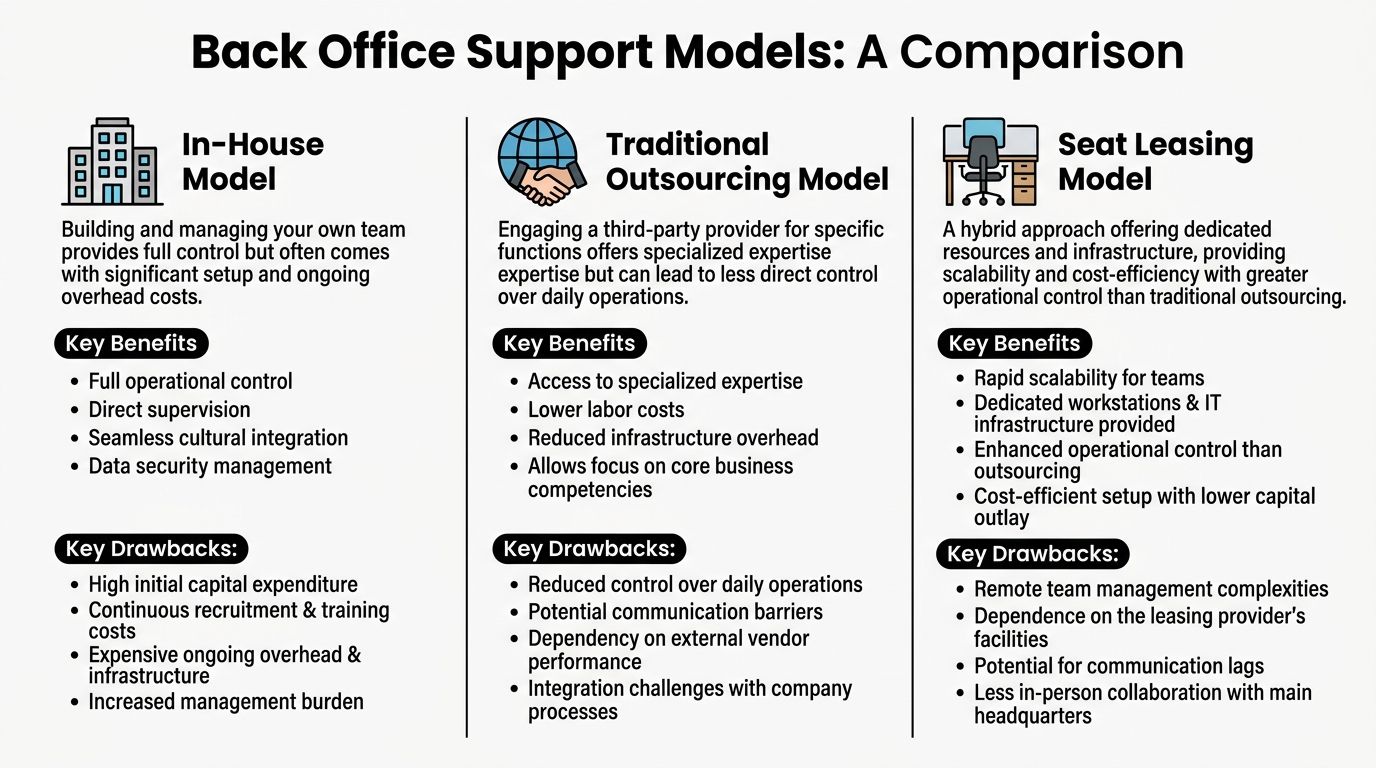
For most startups and SMBs, the options are threefold: build an in-house team, hire a traditional BPO provider, or use a seat leasing arrangement that combines workspace and managed support infrastructure.
The basic trade-off
In-house teams offer direct oversight. Traditional outsourcing can reduce management burden and provide specialist capacity. Seat leasing sits in between. It gives businesses dedicated space and core infrastructure while preserving more day-to-day operational involvement than many standard outsourcing setups.
Security and resilience now shape this choice more than before. According to Stony Hill Advisors, 72% of firms reported back-office breaches costing $4.5M on average, SMBs were 3x more vulnerable, and hybrid BPO workspaces grew by 55% as companies looked for bundled zero-trust security and compliance monitoring that can cut downtime by 60%.
That changes how leaders should think about “cheap” back office setups. Lower monthly cost doesn’t always mean lower operating risk.
Comparison of Back Office Models In-House vs Outsourcing vs Seat Leasing
| Criteria | In-House Team | Traditional BPO | Seat Leasing BPO |
|---|---|---|---|
| Control | Highest direct supervision | Lower day-to-day control | Shared control with dedicated operating environment |
| Setup speed | Usually slower because hiring, systems, and workspace must be built | Faster if provider already has staff and process | Faster for workspace and infrastructure deployment |
| Upfront investment | Often highest due to office, equipment, and setup | Lower capital burden | Lower capital burden with bundled workspace services |
| Scalability | Can be slower to expand or shrink | Easier to scale through vendor capacity | Flexible scaling with physical seats and managed support |
| Expertise access | Depends on who you can hire | Access to provider specialization | Access to infrastructure and support readiness, with room for your own team management |
| Security oversight | Managed internally | Depends on provider standards and SLA discipline | Can include built-in security and compliance monitoring in the setup |
When in-house makes sense
Some businesses need close internal control for cultural or regulatory reasons.
In-house is often the better fit when:
- Processes are highly customized: Your workflows depend on constant, informal coordination between departments.
- Leadership wants direct line management: Managers prefer to supervise every role closely.
- Sensitive knowledge is embedded: The work depends on proprietary methods that are hard to document cleanly.
The downside is you have to build everything yourself, including hiring, office setup, equipment, support coverage, and internal controls.
When traditional outsourcing fits
Traditional BPO can work well when a company wants a provider to own clear, repeatable functions.
It’s useful when:
- The work is process-heavy: data entry, payroll support, document handling
- Service levels are definable: turnaround times, queue handling, reporting cadence
- Internal managers are overloaded: the business wants external execution rather than another team to supervise
The challenge is distance. A provider may meet the contract and still feel disconnected from your pace, culture, or changing priorities.
Why seat leasing attracts agile businesses
Seat leasing appeals to businesses that need infrastructure quickly but don’t want the full burden of building a standalone office. It can work for back office teams, support units, offshore admin functions, and startup operations that need a working environment without a long setup cycle.
The model usually bundles essentials such as workstations, internet, electricity, and managed operational support. That reduces the number of separate vendors the client has to coordinate.
This is especially relevant for companies entering new markets or spinning up back office capacity for the first time. If you want to understand how this model is positioned operationally, the overview at https://seatleasingbpo.com/ gives a concise starting point.
A useful decision test is simple. Ask whether you need to build a department, buy a service, or activate an operating environment.
A practical decision lens for startups and SMBs
If you’re small, don’t choose based on image. Choose based on constraints.
- Pick in-house if you can absorb setup time and want full internal ownership.
- Pick traditional outsourcing if the work is standardized and you want external execution.
- Pick seat leasing if speed, infrastructure, and flexibility matter more than owning every operational layer yourself.
The strongest choice isn’t the one with the most control on paper. It’s the one your team can run well without draining leadership attention.
The Seat Leasing Solution for Modern Businesses
For a lot of growing businesses, the back office problem isn’t labor. It’s setup.
They don’t only need people. They need desks, secure internet, device readiness, support processes, access control, power, and enough structure to start operating without a long build phase.
Why seat leasing solves a different problem
Traditional outsourcing answers, “Who will do the work?”
Seat leasing often answers, “How do we get operational fast without building everything ourselves?”
That distinction matters for startups, freelancers, and smaller firms opening a support team in a new market. They may want dedicated staff and direct process ownership, but they don’t want to spend heavily on office fit-out, IT environment design, and support infrastructure before proving demand.
A 2025 Gartner report indicates 65% of SMBs plan to automate back-office tasks by 2026, and seat-leasing BPO models are emerging as one response by combining physical workspaces with embedded AI-driven services such as cybersecurity and IT, enabling up to 80% cost savings without capital expenditure, according to Helpware.
What the model usually includes
A seat leasing arrangement typically wraps several operational basics into one setup:
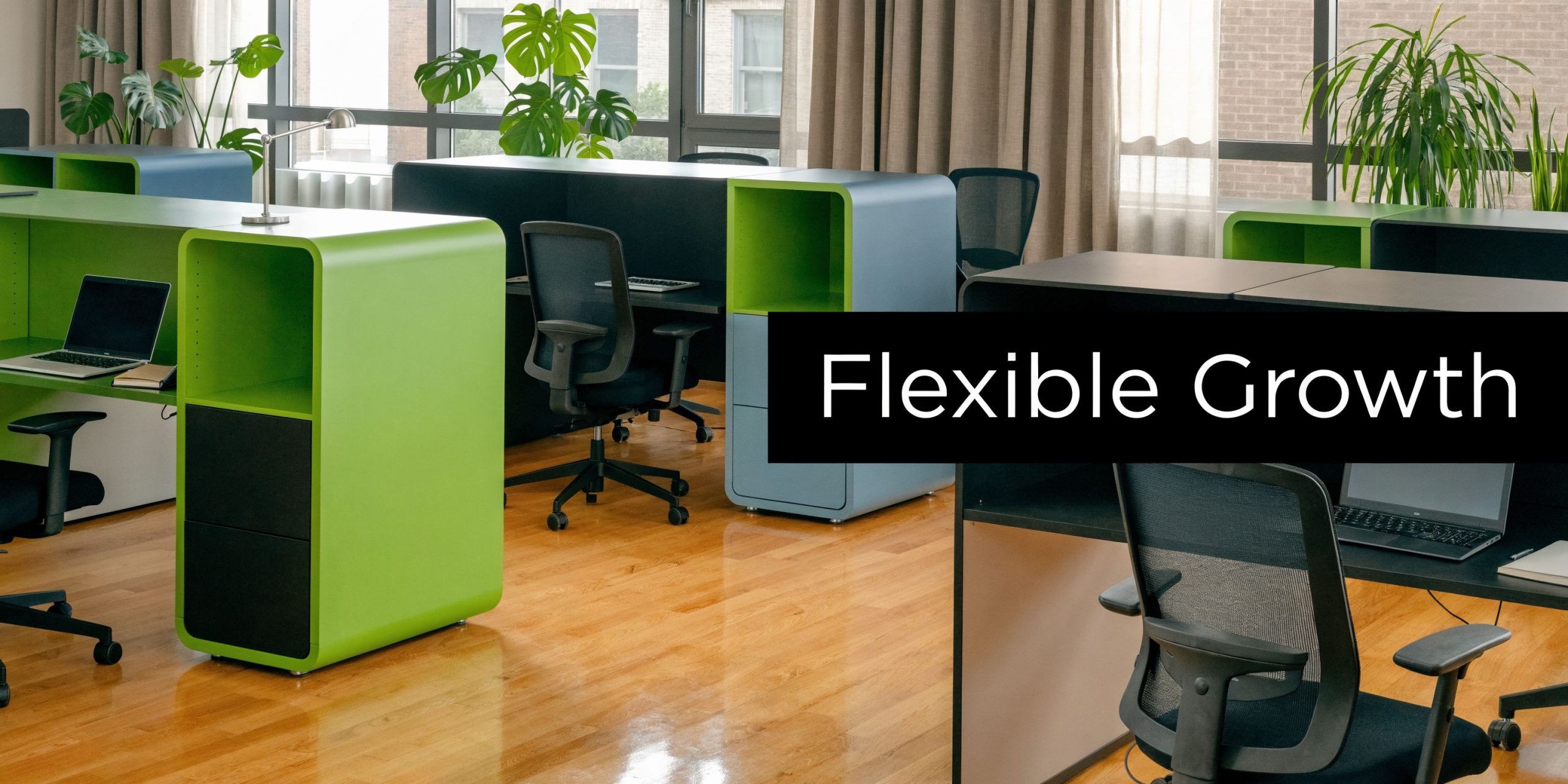
- Workspace readiness: desks, chairs, meeting areas, and physical access
- Connectivity: business internet and network support
- Power and facilities: electricity, maintenance, and workspace upkeep
- IT support layers: device provisioning, system access support, and environment stability
- Security support: controls that help protect business data and operations
For many teams, that’s the difference between a months-long setup project and a much shorter launch path.
Why this fits modern back office work
Back office support today often mixes people, software, and automation. That means the work benefits from an environment designed for consistency.
A payroll or data operations team can’t perform well if internet reliability is uncertain. An admin support team can’t maintain clean records if onboarding access is delayed. A remote-first company still needs a place where workstations, controls, and support are organized.
That’s why seat leasing can work well for agile companies. It removes a layer of operational drag.
One option businesses evaluate for this kind of bundled setup is Seat Leasing BPO inclusions, which outlines the types of infrastructure and support services that can come packaged with the workspace.
Here’s a visual walkthrough of the model in practice.
The primary advantage is focus
The biggest gain isn’t lower capital expense. It’s cleaner management focus.
When founders don’t have to coordinate office buildout, vendor setup, internet contracts, workstation readiness, and support basics separately, they can spend more time on delivery, hiring quality people, refining process, and winning business.
That’s especially useful when the company is still learning what its final operating shape should be. Seat leasing gives it room to adjust without committing too early to a fixed office model.
“Get the environment stable first. Then optimize the workflow.”
Where seat leasing is a strong fit
This model tends to make the most sense when:
- A startup needs quick launch capability for support, admin, or offshore operations
- An SMB wants lower capex exposure while still maintaining a dedicated work environment
- A BPO or distributed team needs overflow capacity without long-term facility commitments
- A company is testing a new geography before investing in a permanent office
Seat leasing won’t replace every internal function. But for businesses that need a working operational base quickly, it changes the economics and the timeline in a practical way.
Building a Foundation for Scalable Growth
Back office support is easy to ignore when the business is small and everyone is improvising. It becomes impossible to ignore once volume rises, errors stack up, and leaders spend too much time on internal cleanup.
That’s why the question isn’t only what is back office support. The better question is whether your business has built it in a way that can keep up with growth.
The strongest companies treat the back office as infrastructure. HR keeps people moving. Finance protects visibility. IT keeps work possible. Admin and compliance keep the organization reliable. When those pieces work together, customer-facing teams perform better because they aren’t constantly compensating for internal disorder.
The operating model matters as much as the function itself. Some businesses need in-house control. Others do well with outsourcing. Many newer, faster-moving teams need a setup that gives them speed, flexibility, and a managed environment without heavy upfront investment.
If your business feels busy but harder to run than it should, the fix may not be more hustle. It may be a stronger back office built on better decisions.
If you’re evaluating practical ways to support admin, finance, IT, and operations without taking on full office setup costs, Seat Leasing BPO is worth considering as one operating model for building a flexible back office environment.