Your team is doing the work. Your systems are getting in the way.
A sales rep waits for a file to load before a client call. Finance exports data into spreadsheets because the old system can’t talk to the new one. A remote employee drops off a video meeting because the office network wasn’t built for distributed work. Nobody calls that “technical debt” in the moment. They call it a bad day.
For a growing business, that bad day becomes a pattern. Delays pile up. Workarounds become standard procedure. Security feels reactive instead of planned. And every time you want to launch a new service, hire fast, or support a hybrid team, your old setup pushes back.
That’s why it modernization services matter. Not because “modern” sounds good, but because outdated tech drains cash, time, and flexibility. For startups, SMBs, freelancers, and BPO operators, the question isn’t whether modernization is relevant. It’s whether you can afford to keep operating with systems that make growth harder than it needs to be.
Your Old Tech Is Costing You More Than You Think
A familiar example looks like this.
A small customer support company starts with a simple office setup. A few desktops. Shared folders. One server in a back room. A mix of old business apps that “still work.” At first, that feels sensible. Why replace something that isn’t fully broken?
Then the company grows.
New hires need accounts, devices, permissions, and secure access. Clients ask tougher questions about data protection. Managers want reports faster. Some employees work on site, some from home, and some switch between both. Suddenly the old setup isn’t just old. It’s actively slowing the business down.
The hidden costs aren’t hidden to your team
Employees see them every day:
- Slow systems: Staff wait for files, dashboards, or logins.
- Patchwork tools: People copy information from one system to another because nothing connects cleanly.
- Support delays: One IT issue can stall a full shift.
- Security anxiety: Teams hesitate before opening attachments or using public networks because they don’t trust the setup.
Those costs don’t always show up as one line item in a budget. They show up as missed hours, frustrated employees, and clients who notice slow response times.
Old tech rarely fails all at once. It fails in small, expensive interruptions.
Growth exposes weak foundations
A legacy setup can survive when a business is small and stable. It struggles when the business becomes dynamic.
That’s where many owners get confused. They think modernization means buying all new systems at once. Usually, it doesn’t. It means deciding which parts of your tech stack are blocking revenue, productivity, or trust, then fixing those first.
If your systems can’t support remote access, clean data sharing, reliable connectivity, and stronger security, you don’t just have an IT problem. You have an operations problem.
Why this hits the bottom line
When technology creates friction, people compensate manually. Manual work is expensive. So is downtime. So is delaying expansion because your infrastructure can’t support it.
For many businesses, the trigger isn’t a dramatic outage. It’s the realization that every new hire, every new location, and every new client request now requires too much effort from the back office.
That’s the point where it modernization services stop being a technical conversation and become a business decision.
What Are IT Modernization Services Really
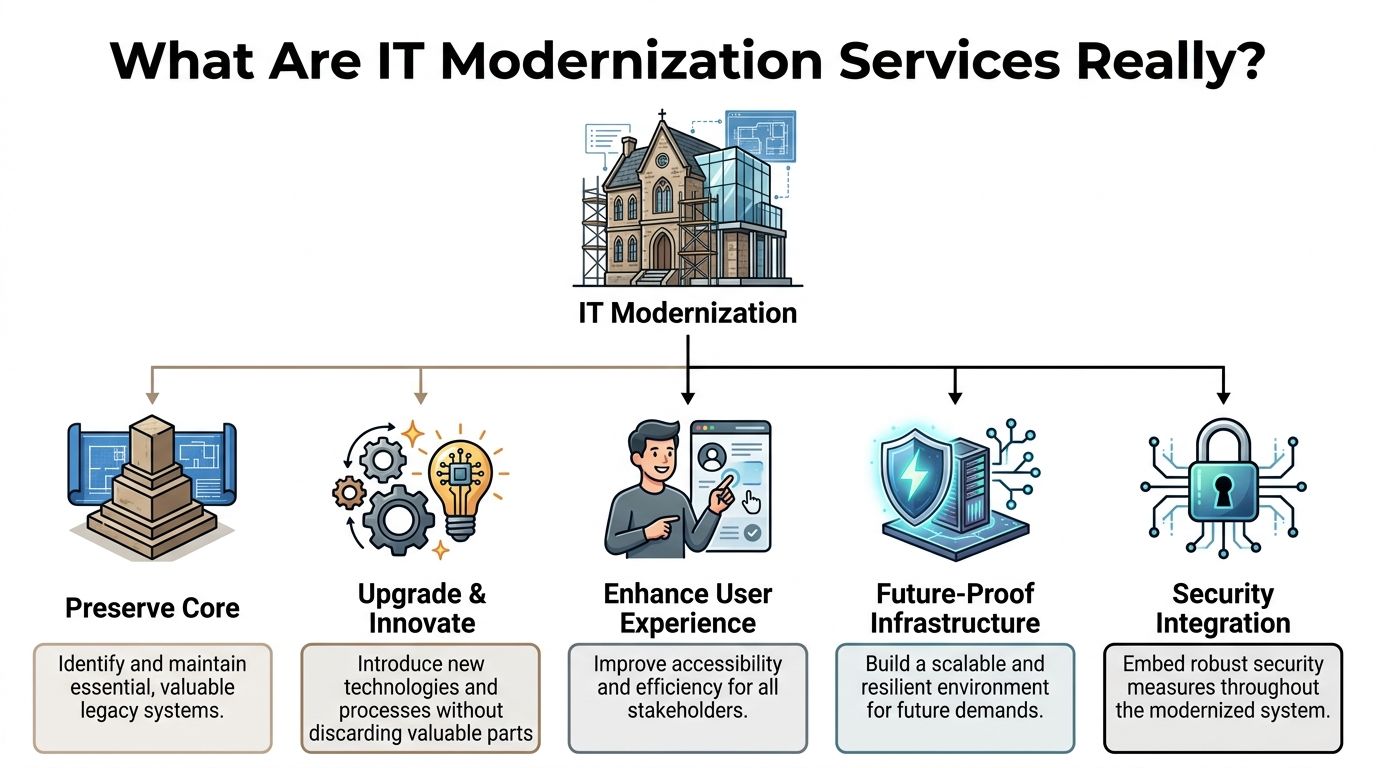
Think of your technology environment like a historic building in a great location.
The structure still has value. The location still works. The building may even be central to how your business operates. But the wiring is outdated, the plumbing is unreliable, and the layout wasn’t designed for how people work today. You don’t automatically tear it down. You renovate it so it can support modern use.
That’s the simplest way to understand it modernization services.
Modernization is not the same as a basic upgrade
A basic upgrade swaps one tool for a newer version. Optimization makes an existing process run better. Modernization is broader.
It asks bigger questions:
- What should stay: Which systems still hold value for the business?
- What should move: Which workloads belong in cloud platforms like AWS or Microsoft Azure?
- What should change: Which applications, security controls, and workflows are too rigid for current demands?
- What should connect: Where are the biggest handoff problems between systems, teams, and vendors?
This is why modernization often touches applications, data, infrastructure, security, and user access at the same time.
Why businesses are making this move
The pressure is no longer limited to large enterprises. The application modernization services market was valued at USD 22.67 billion in 2024 and is projected to reach USD 51.45 billion by 2031, with a 14.6% CAGR from 2025 to 2031, while 94% of global companies already use cloud environments according to MarketsandMarkets research on application modernization services.
That matters because customer expectations changed. Employees expect tools to work from anywhere. Leaders expect cleaner reporting. Clients expect better security answers. Modern systems make those expectations easier to meet.
What modernization looks like in practice
A business doesn’t have to rebuild everything from scratch.
Sometimes modernization means moving file storage and collaboration into a managed cloud platform. If your team is wrestling with aging document workflows, a practical example is reviewing how SharePoint migration services fit into a broader modernization effort. The point isn’t SharePoint itself. The point is replacing brittle document handling with something easier to govern, search, and scale.
Other times it means combining office infrastructure, cybersecurity, connectivity, and workstation readiness into a managed operating model rather than building each piece alone. That bundled approach is one reason some businesses look closely at what’s already included in managed workspace environments such as https://seatleasingbpo.com/inclusions/.
Practical rule: Modernization should reduce operational drag. If a proposed project adds complexity without improving speed, control, or resilience, it’s probably the wrong project.
The business outcome
When done well, modernization gives you a setup that is easier to maintain, easier to secure, and easier to scale. You keep what still works. You replace what holds you back. You stop treating the IT environment like a collection of isolated purchases and start treating it like business infrastructure.
That’s the meaning of it modernization services. It’s not “new tech for the sake of new tech.” It’s a structured way to make your business more adaptable.
The Five Pillars of a Modern IT Infrastructure
Most business owners don’t need to memorize every technical term. They do need a clear model for what a modern setup includes.
A useful way to think about it is through five pillars. If one is weak, the rest of the system feels unstable.
A 2025 survey of 400 IT decision-makers found that cybersecurity was the top modernization priority at 53%, followed by data management at 45% and cloud migration at 44%. The same source notes that 40% of IT budgets are allocated to cloud, SaaS, and infrastructure in NMS Consulting’s 2025 IT services consulting industry trends. That tells you where leaders are focusing first.
Cloud migration
Cloud migration means moving workloads away from hardware you manage yourself and into platforms designed for flexibility.
For a business owner, the practical value is simple. You stop tying growth to a server closet. If you add staff, open a new team, or support hybrid work, cloud services usually adapt faster than on-premise equipment.
A good example is a support team that needs shared access to files, dashboards, and communication tools from different locations. In a modern cloud setup, they can log in securely without relying on one physical office as the center of operations.
Network modernization
Many companies overlook the network until calls start dropping or systems lag.
A modern network isn’t just “faster internet.” It’s the combination of reliable connectivity, better segmentation, stronger remote access, and more predictable performance for cloud apps, voice tools, and distributed teams.
If your agents are on video calls, using browser-based tools, and accessing centralized platforms all day, weak network design turns into service problems. Clients don’t care whether the bottleneck came from outdated switches, poor office design, or overloaded links. They care that their call quality was bad.
Advanced security
Security can’t be bolted on after the move. It has to be built into the environment.
That includes identity controls, access permissions, endpoint protection, monitoring, encryption, and clear rules around who can access what. For regulated industries or client-sensitive work, this is often the pillar that shapes every other decision.
Here’s where owners sometimes get tripped up. They assume stronger security means slower work. In a well-designed environment, the opposite is often true. Staff get clearer access paths, fewer risky workarounds, and better support for remote work.
Better security usually starts with better structure, not more fear.
Application modernization
This pillar focuses on the software your team uses to run the business.
Some applications need replacement. Some need redesign. Some can stay in place but move into a better hosting model. The goal is to reduce friction.
Consider an old internal system that forces staff to re-enter customer details into multiple screens. That’s not just annoying. It’s expensive and error-prone. A modern application stack should support cleaner workflows, easier updates, and better integration with customer-facing tools.
Data and AI integration
Businesses often sit on useful data but can’t trust it, combine it, or act on it quickly.
Modern infrastructure makes it easier to centralize data, control access, and prepare information for reporting, automation, and AI-supported workflows. This doesn’t mean every business needs an advanced AI strategy on day one. It means your systems shouldn’t block one later.
For instance, if sales, operations, and support each keep separate records, leaders spend time arguing over whose spreadsheet is right. A modern data foundation helps teams work from the same source of truth.
How the five pillars work together
These pillars aren’t separate purchases. They’re connected decisions.
- Cloud supports scale: It gives teams room to grow without rebuilding infrastructure every time.
- Networks support reliability: They keep cloud tools usable in real working conditions.
- Security supports trust: It protects clients, employees, and business continuity.
- Applications support productivity: They shape daily work quality.
- Data supports decisions: It helps leaders act faster with better information.
If you’re trying to evaluate practical examples of how businesses are thinking about these changes, the articles collected at https://seatleasingbpo.com/blog/ are useful for seeing how workspace, infrastructure, and operations intersect in real-world setups.
Calculating the Business Benefits and Real ROI
Modernization often gets approved for the wrong reason. Someone says the old system is outdated, the IT team agrees, and management signs off because replacement feels inevitable.
That’s weak justification.
A better case starts with business outcomes. If you can’t explain what changes financially or operationally, you’re not ready to spend.
Start with the simplest ROI question
Ask this first: what is the current environment costing us that we’ve normalized?
Look at four buckets:
- Direct operating costs: Hardware upkeep, support contracts, patchwork vendors, emergency fixes.
- Productivity drag: Time lost to slow systems, duplicate entry, downtime, and manual reporting.
- Risk exposure: Weak security posture, inconsistent backups, limited visibility, and compliance headaches.
- Growth friction: Delays when adding staff, opening locations, supporting remote work, or rolling out new services.
If your business can’t scale without another round of ad hoc IT work, that’s a cost.
One approach that often creates quick wins
Not every project needs deep redevelopment on day one. According to DXC Technology’s analysis of IT modernization success factors, rehosting, often called lift-and-shift, can deliver 30% cost savings through IT outsourcing. The same source says modernized firms can see 25% faster decision-making and 40% operational efficiency gains due to cloud elasticity.
That matters because lift-and-shift is often easier for business owners to grasp. You’re moving an existing workload into a better operating environment without first rebuilding the whole application.
A simple ROI frame you can use in meetings
Try this table when discussing a proposed modernization project.
| ROI area | Questions to ask | What improves |
|---|---|---|
| Cost control | What do we spend today to keep aging systems running? | Lower maintenance burden and fewer surprise fixes |
| Team output | How much staff time goes to waiting, rework, or manual transfers? | Faster workflows and less wasted effort |
| Speed to change | How long does it take to onboard people, deploy tools, or support new clients? | Better agility and shorter rollout cycles |
| Risk reduction | Where are our biggest security or continuity weaknesses? | Stronger resilience and cleaner governance |
A business owner doesn’t need a perfect finance model at the start. You need a credible one.
If a modernization initiative saves your team time every day, lowers support friction, and makes growth easier, the return usually shows up in operations before it shows up in a spreadsheet.
Don’t ignore reinvestment value
Savings matter. So does what those savings make possible.
If your managers spend less time chasing reports, they can act faster. If your support environment is more stable, client service improves. If your systems are easier to scale, you can take on work that used to feel operationally risky.
This short video offers a useful visual explanation of the modernization mindset and why companies treat it as a strategic move rather than a pure IT refresh.
What ROI looks like for smaller businesses
For SMBs, the best returns often come from avoiding overbuild.
You don’t need the same architecture as a global enterprise. You need the right level of reliability, security, and flexibility for your size and growth stage. That’s why good modernization decisions often feel boring in the best way. Fewer interruptions. Faster onboarding. Cleaner processes. Better control.
That’s ROI. Not hype. Not vanity metrics. Operational improvement that compounds.
Your Roadmap to Modernization Success
Many projects fail because the company starts shopping before it starts thinking.
A software demo looks impressive. A cloud vendor promises speed. An outsourced provider offers a package. None of that matters if you haven’t defined what problem you’re solving and what “better” looks like for your business.
Assess your current environment
Start with an honest inventory.
List the systems your team uses every day. Include business applications, file storage, communication tools, devices, connectivity, security controls, and any manual workarounds staff rely on. The workarounds matter because they usually reveal where your process is broken.
Use questions like these:
- What breaks most often: Which systems trigger the most complaints or delays?
- What can’t scale: Where would growth immediately create stress?
- What feels risky: Which parts of the environment create the most concern around security, access, or continuity?
- What depends on one person: Where does tribal knowledge sit with a single employee or vendor?
Set business goals before technical goals
Don’t begin with “we need cloud” or “we need new hardware.”
Begin with business outcomes such as faster onboarding, better support for remote staff, cleaner client reporting, stronger access controls, or easier expansion into a larger team. Technical choices should support those goals.
This also helps avoid a common trap. Companies often buy a modern tool that doesn’t fit how the business works.
Choose the right implementation style
Some businesses need a gradual rollout. Others need a fast transition because the current environment is unstable.
A practical plan usually includes:
- Immediate fixes for the most painful bottlenecks.
- Foundational work such as access control, connectivity, and platform cleanup.
- Longer-term changes to applications, integrations, or reporting.
That phased thinking helps leaders control disruption and budget pressure.
Pick a partner with operational discipline
A provider shouldn’t just sound technical. They should be able to explain tradeoffs clearly.
Ask how they handle migration planning, user support, access management, backup strategy, vendor coordination, and post-launch optimization. If their answers stay vague, assume execution will be vague too.
Here’s a checklist you can use in vendor conversations.
| Evaluation Criteria | What to Look For | Importance (Low/Med/High) |
|---|---|---|
| Business alignment | Can they connect technical recommendations to your operational goals? | High |
| Modernization scope | Do they cover infrastructure, applications, security, and data needs clearly? | High |
| Security approach | Can they explain identity controls, monitoring, access policies, and incident response in plain language? | High |
| Support model | Who handles day-to-day issues after rollout, and how are requests managed? | High |
| Migration planning | Do they map dependencies and sequence changes carefully? | High |
| Flexibility | Can they support phased implementation instead of forcing one big-bang project? | Med |
| Cost structure | Are pricing, ongoing charges, and change requests transparent? | High |
| Documentation | Will they document systems, processes, and responsibilities so knowledge isn’t trapped with one person? | High |
| User experience focus | Do they care about how employees will use the new environment? | Med |
| Fit for company size | Are they right-sized for an SMB or startup, not only for enterprise accounts? | High |
Define success before rollout
Agree on a small set of measures that matter to the business.
That may include fewer support interruptions, faster onboarding, reduced system complaints, cleaner access management, or improved reporting turnaround. Keep the list short enough that leadership will review it.
A modernization project succeeds when business leaders can feel the difference in daily operations, not just when IT says the migration is complete.
Treat modernization as an operating shift
The rollout is not the finish line. Once the new environment is live, teams usually need small process changes, user training, clearer ownership, and periodic reviews.
That sounds less exciting than “digital transformation,” but it’s where value gets protected. A technically sound system can still underperform if nobody updates workflows, documentation, or accountability.
The strongest roadmap is usually the least dramatic one. Clear priorities. Phased execution. Measurable business outcomes. A partner who can explain the work without hiding behind jargon.
The Seat Leasing Advantage A Capex-Free Path to Modern IT
Many guides on it modernization services assume you’ll build the environment yourself. You’ll source the office, contract the connectivity, buy the equipment, arrange support, layer in cybersecurity, and coordinate vendors until the whole system works.
That assumption breaks down for startups and smaller firms.
For them, the biggest barriers usually aren’t strategy. They’re capital expense, setup time, and operational complexity. If you need a plain-English refresher on what CapEx and OpEx mean, it helps clarify why so many growing businesses prefer operating models that avoid heavy upfront spending.
Why the seat leasing model changes the equation
Here, a managed seat leasing BPO model becomes unusually practical.
Instead of building your own modern environment piece by piece, you step into a workspace model where core infrastructure is already in place. That can include managed IT, cybersecurity, internet connectivity, and operational readiness from the start. The business benefit isn’t just convenience. It’s avoiding the long, capital-heavy setup cycle that stalls smaller companies.
Research highlighted in GovExec’s discussion of infrastructure modernization and cost savings notes that existing modernization content rarely addresses how SMEs can achieve 80% cost savings via plug-and-play workspaces with pre-managed IT, cybersecurity, and connectivity. The same source also notes that SMEs can face 30% to 50% higher relative costs due to unscaled vendor pricing, which helps explain why integrated models matter more for smaller organizations than many enterprise-focused articles admit.

Three situations where this model makes immediate sense
A startup that needs to launch fast
A young company wins a new client and has to stand up an operational team quickly.
If it builds everything itself, leadership spends time on internet contracts, workstation setup, access controls, office readiness, and support coordination. In a managed seat leasing setup, much of that groundwork is already handled. The startup can focus on hiring, onboarding, and delivery.
An SMB that expects uneven growth
A small business may not grow in a straight line. It might add people quickly for one project, then stabilize, then expand again.
That’s awkward when your infrastructure is self-built and sized too tightly. A seat leasing model gives the business room to add capacity without redesigning the environment every time headcount changes.
A BPO team that needs credibility with clients
Clients often ask hard questions about security, continuity, and operational readiness.
A provider working from a managed, infrastructure-ready environment can answer those questions more confidently than one piecing systems together under pressure. Reliability becomes part of the offer, not a scramble behind the scenes.
Why this matters for bottom-line agility
Traditional enterprise modernization guides tend to assume your company has internal IT depth, strong purchasing power, and time. Many SMBs don’t.
That’s why the seat leasing model deserves more attention than it gets. It doesn’t replace every modernization decision. You still need process discipline, application choices, and governance. But it can remove the most punishing first step, which is building a modern operating environment from scratch.
For businesses evaluating flexible workspace options with bundled infrastructure, https://seatleasingbpo.com/ shows what this kind of operating model looks like in practice.
The smartest modernization move for a smaller company is often not owning more technology. It’s getting access to a better operating environment without carrying the full build cost.
Common Pitfalls and How to Sidestep Them
Modernization projects are often sold as if the only risk is moving too slowly. That’s not true. Plenty of projects move quickly and still go badly.
One reason is focus. Teams get excited about tools, platforms, or migration methods before they’ve clarified the business problem.
According to CGI’s analysis of AI-powered IT modernization challenges, up to 70% of IT modernization projects fail because of a “lost in solution” focus and reliance on tribal knowledge. That’s especially dangerous for SMEs, where a few overloaded people often carry too much undocumented process knowledge.
Pitfall one: unrealistic timelines
Leaders sometimes assume a provider can “just move everything” quickly.
That creates pressure to skip discovery, shorten testing, and rush user adoption. The result is usually confusion, rework, and frustrated teams.
A better move is to phase the work. Stabilize what hurts most. Protect critical operations. Then expand the scope.
Pitfall two: weak business alignment
If the project goal is “modernize IT,” nobody knows how to judge success.
Tie the work to business outcomes instead. Faster onboarding. Better client reporting. Stronger remote access. More reliable operations. Those are outcomes managers can evaluate.
Pitfall three: tribal knowledge traps
Many older environments function because one employee knows where the exceptions live.
That person knows the hidden process, the manual export, the special login path, or the sequence required to keep an old app alive. If that knowledge isn’t documented, modernization gets harder and riskier.
Use workshops, process mapping, and plain-language documentation before making major changes.
Pitfall four: treating security as a later phase
Security, access control, and compliance can’t wait until “after migration.”
If your business handles client data, regulated information, or distributed access, those controls should shape the design from the beginning. That includes understanding relevant requirements such as GDPR, HIPAA, or CCPA before vendor decisions lock you into the wrong setup.
The fastest way to overspend on modernization is to discover your requirements after the environment is already built.
Pitfall five: poor communication with users
Employees don’t resist change because they love old systems. They resist disruption they don’t understand.
Tell teams what’s changing, why it matters, what support they’ll get, and what temporary friction to expect. Clear communication reduces panic and avoids shadow processes.
Good modernization isn’t magic. It’s disciplined execution with fewer assumptions.
Frequently Asked Questions About IT Modernization
Is modernization only for large enterprises
No. Smaller businesses often feel the pain sooner because they have less slack in the system.
An enterprise can sometimes absorb inefficiency for longer. A startup or SMB usually can’t. If a few outages, slow systems, or clumsy handoffs affect revenue or service quality, modernization is already a business issue.
Do we have to replace everything at once
No, and that’s usually a bad idea.
Most companies should modernize in phases. Keep what still creates value. Fix what creates the most drag. Sequence the work so your team can keep operating while the environment improves.
How do I justify the cost to skeptical stakeholders
Frame the conversation around risk, productivity, and agility.
Don’t say “we need newer tech.” Say “our current setup slows onboarding, creates security exposure, and limits our ability to scale.” Stakeholders respond better when the argument connects to continuity, client trust, and growth capacity.
What if we don’t have an internal IT team
That’s common, especially in smaller firms.
You don’t need a large in-house department to make smart modernization choices. You do need clear goals, honest assessment, and the right outside support model. For many smaller businesses, managed infrastructure arrangements are easier to control than building everything internally.
What’s the first practical step
Start by documenting friction.
List where staff lose time, where systems break, where access feels messy, and where growth would strain your setup. That simple exercise often reveals the first modernization priorities faster than any vendor pitch will.
Can modernization reduce disruption instead of causing it
Yes, if it’s planned correctly.
The best projects reduce daily friction because they remove unstable tools, clarify access, and simplify support. Disruption usually comes from poor sequencing, not from modernization itself.
How do I know if a vendor is overcomplicating the project
Listen to how they explain it.
If they can’t describe the plan in plain business language, they may not understand your operating reality well enough. A good partner can talk to both technical teams and business leaders without hiding behind jargon.
If your business needs a lower-capex way to operate with modern infrastructure, secure connectivity, and ready-to-use workspace support, Seat Leasing BPO is worth a close look. It offers a practical path for companies that want to improve agility without taking on the cost and delay of building everything themselves.