Most companies look for an increase in roi in ads, pricing, or headcount. They should start with the office.
That sounds backwards until you look at how ROI gets distorted. Many businesses chase high percentage returns on small tactical spends while ignoring larger absolute profit opportunities. As The ROI Illusion analysis points out, a 500% ROI on a $100K project yields $400K profit, while a 150% ROI on a $10M investment yields $5M profit. The lesson is simple. Efficiency matters, but scale and capital allocation matter more.
A managed workspace changes both. It can cut fixed overhead, remove CapEx, shorten setup time, and free cash for hiring, sales, product, or customer acquisition. If you still treat office space as a background expense, you're probably understating your real costs and missing one of the cleanest operational levers available.
Beyond the Balance Sheet How Workspace Strategy Drives ROI
The old assumption is that office space sits in the same category as electricity or insurance. You pay it, tolerate it, and move on. That view is expensive.
Workspace is an operating system decision. It affects how fast teams launch, how much capital gets tied up before revenue starts, how many vendors your ops team has to manage, and how easily you can expand or contract without penalties. A business that signs a conventional lease isn't just renting square footage. It's accepting a stack of related obligations that keep growing after move-in.

Why fixed offices hurt ROI
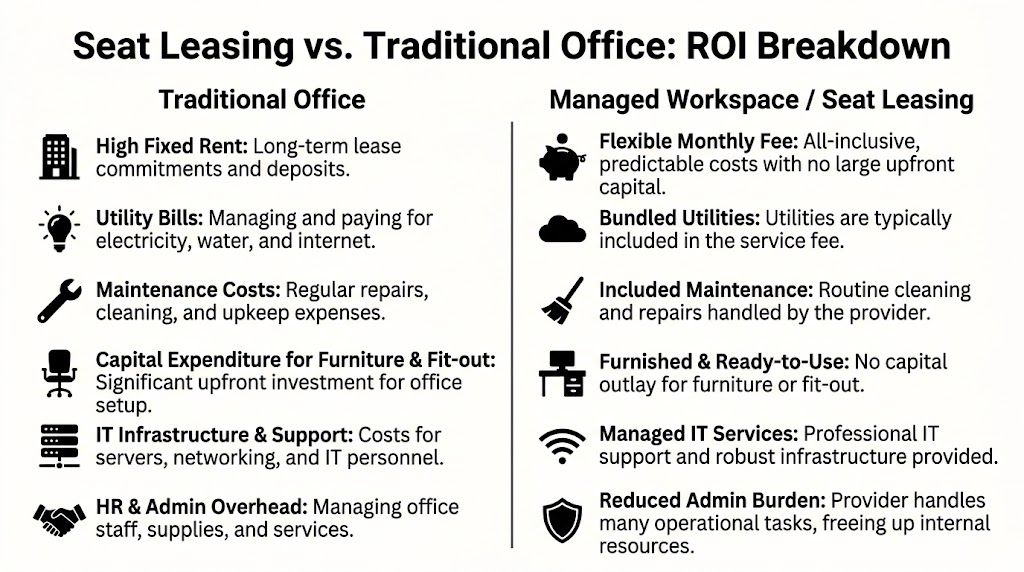
Traditional offices drain ROI in two ways. First, they absorb capital upfront through fit-out, furniture, deposits, networking, and basic readiness work. Second, they keep pulling management attention into facilities, utilities, repairs, security coordination, and vendor follow-up.
That combination is why workspace belongs in the ROI conversation, not outside it. Leaders often work hard to optimize campaigns while leaving a large operational cost structure untouched.
Practical rule: If a cost center consumes cash, management time, and setup effort, it isn't fixed. It's a candidate for redesign.
For operators, the better question isn't "How do we find cheaper office space?" It's "Which workspace model produces the strongest business outcome per dollar committed?" That shift changes the decision from procurement to strategy.
The capital-efficient alternative
Managed workspaces and seat leasing solve a different problem than bargain hunting. They reduce friction. Instead of building an office from scratch, you buy speed, bundled infrastructure, and cleaner cost visibility. That matters for startups opening their first delivery team, BPO providers adding seats quickly, and established firms testing a new market without locking themselves into years of overhead.
If you're reviewing broader strategies to reduce company costs, this is one of the few moves that can lower expense and improve operational flexibility at the same time.
The increase in roi comes from what the model prevents as much as from what it provides. No long procurement cycle for desks. No piecemeal internet setup. No fragmented handoff between landlord, cleaner, ISP, and IT contractor. Teams get a workspace that behaves more like a service than a project.
Calculate Your True Office Costs A Baseline ROI Audit
Most office ROI calculations fail before the math starts. The baseline is incomplete.
Leaders usually compare monthly rent against a monthly seat rate and assume they're being rigorous. They aren't. The true comparison is the all-in cost per employee per month once every occupancy-related expense is pulled into view. Until you do that, any claimed increase in roi is guesswork.
Start with avoided costs, not vague benefits
A common mistake in ROI work is failing to translate indirect operational savings into financial impact. A stronger approach is to quantify avoided costs such as IT infrastructure that a seat leasing provider handles, especially when Global 2000 IT budgets are expected to grow by 3.4% in 2025. That's more reliable than making loose claims about productivity without proof.
Discipline becomes essential for ops teams. If a managed workspace removes server room setup, internet procurement, endpoint coordination, and basic facility admin, those aren't soft benefits. They're costs you no longer carry internally.
What to include in the audit
Build the baseline from the ground up. Pull actual invoices, contracts, payroll allocations, and support tickets where possible.
- Lease and occupancy charges Rent, association fees, parking, deposits amortized over the contract term.
- Fit-out and furniture Workstations, partitions, meeting room setup, storage, signage, reception furniture.
- IT and connectivity Internet lines, routers, switches, backup lines, endpoint setup, maintenance contracts.
- Cybersecurity and access Firewall tools, CCTV, access control, badge systems, monitoring.
- Utilities and upkeep Electricity, water, janitorial, pest control, repairs, air-conditioning servicing.
- Facility administration Internal admin time spent on procurement, landlord issues, compliance, and vendor management.
- Opportunity cost of tied capital Cash locked into deposits and setup instead of revenue-producing uses.
If your records are scattered, it helps to begin with something like conducting an asset survey so you know what equipment and infrastructure you're carrying.
Traditional Office vs. Seat Leasing Cost Breakdown (Per Employee/Month)
| Cost Category | Traditional Office (Estimated) | Seat Leasing (Included) |
|---|---|---|
| Rent and building occupancy | Separate recurring cost | Included in monthly fee |
| Furniture and workstation setup | Amortized setup expense | Included |
| Internet and network readiness | Separate vendor and support cost | Included |
| IT infrastructure support | Internal or outsourced expense | Included |
| Cybersecurity and access controls | Separate tools and maintenance | Often bundled |
| Electricity and utilities | Variable monthly cost | Included |
| Cleaning and maintenance | Separate contracts or admin burden | Included |
| Facility management time | Internal overhead | Largely reduced |
That table won't give you a final number by itself. It does give you the right categories, and that's where most businesses go wrong.
Build one usable benchmark
Create a single worksheet with two outputs:
- Current all-in office cost per employee per month
- Current total non-core admin hours spent supporting the office
Then compare those against a bundled model and the service scope listed in a provider's workspace inclusions. Without that scope check, teams often assume apples-to-apples when one option includes IT, security, and utilities and the other does not.
The cleanest ROI decisions come from ugly spreadsheets. If the baseline is honest, the decision usually gets easier.
How Seat Leasing Delivers an Immediate Increase in ROI
The strongest argument for seat leasing isn't abstract flexibility. It's financial compression. You remove costs, you simplify operations, and you release capital that would otherwise sit inside office infrastructure.
That matters in an environment where proving returns is under pressure across the business. In 2025, 83% of marketing leaders said demonstrating ROI was their top priority, up from 68% five years earlier, and 64% of companies base future marketing budgets on past ROI performance according to Firework's marketing ROI statistics. The same logic applies to operations. Every non-core expense now has to justify itself.
Where the savings actually come from
Managed workspaces can deliver up to 80% cost savings compared with traditional office arrangements when the model replaces long leases, fit-out expense, IT setup, and backend support overhead. The gain doesn't come from one line item. It comes from stacking multiple reductions into one simpler operating expense.
Here is what typically changes:
- CapEx disappears upfront You don't fund furniture, fit-out, structured cabling, and room readiness before work begins.
- Support costs shift to the provider Internet, electricity, core IT environment, and day-to-day maintenance are handled as part of the service model.
- Internal admin load drops Ops managers stop spending hours coordinating cleaners, repair vendors, utility issues, and routine facilities troubleshooting.
- Cost predictability improves A bundled monthly fee is easier to forecast than variable occupancy costs with periodic surprise expenses.
Why this improves ROI fast
A traditional office delays value. Cash goes out before the team is productive. Seat leasing shortens that lag. Teams can move into a ready environment and start operating sooner, which improves the timing of returns even before you calculate total savings.
There's also a strategic benefit that finance teams appreciate. Office setup shifts from a balance-sheet-heavy project to a cleaner operating expense. That makes expansion decisions easier to stage and reverse if conditions change.
Managed workspace ROI isn't just about paying less for space. It's about paying less for delay, distraction, and complexity.
For growing teams, that difference is substantial. A company can redirect funds that would have gone into office buildout into recruitment, sales coverage, customer support, or launch activity. That's why an increase in roi from workspace decisions often shows up outside the facilities budget first.
If you're comparing delivery models or expansion options, a neutral benchmark is to review a specialist seat leasing setup and map each included service back to a current cost or task your team carries today.
Your Action Plan for Migrating to a Managed Workspace
A good migration feels controlled, not dramatic. The teams that switch well don't rush. They define requirements early, assign owners, and measure the change against the previous setup instead of relying on gut feel.

The discipline matters. Applying the ROI Institute's structured process to workspace deployments can drive 40% higher goal achievement, while 70% of ROI projects fail due to inconsistent isolation. In practical terms, that means tracking outcomes such as onboarding speed in the new setup versus the old one, rather than crediting every improvement to the move. The same source notes onboarding can improve by 20% to 30% when measured correctly in these implementations, as explained in this ROI methodology guide.
Phase one needs definition
Start with requirements, not providers. Write down what the team must have on day one.
- Seat count and growth pattern Don't just list today's headcount. Note expected expansion, seasonality, and shift coverage.
- Technical environment Internet redundancy, workstation specs, access controls, call handling needs, and any compliance-related restrictions.
- Support model Who handles first-line IT issues, visitor management, cleaning, and after-hours access.
- Location logic Commute patterns, client access, transport, and labor pool relevance.
This is also the point where leaders need to separate preferences from essentials. A nice pantry isn't critical. Stable connectivity and secure access usually are.
Phase two provider diligence
Once the requirements are clear, assess providers against operating reality.
Ask for a live walkthrough. Inspect workstation condition, cable management, noise levels, meeting room rules, security controls, and how support requests get handled. Review contract terms carefully, especially notice periods, service inclusions, escalation paths, and what counts as billable add-ons.
Use a simple review lens:
- Can the provider support the workflow you run now?
- Can they support the headcount you expect next?
- Can they prove service delivery beyond the sales pitch?
Field advice: The best provider isn't the one with the nicest tour. It's the one whose service boundaries are clear before you sign.
A direct conversation with a provider contact helps surface these issues early, especially if your team has unusual infrastructure or security needs. A practical starting point is to discuss requirements with a workspace team before committing to a final shortlist.
Phase three migration execution
The move itself should run like a compact operations project.
- Data and systems first Backups, account access, device inventory, and network readiness should be checked before desks are assigned.
- Pilot before full move If possible, move a small function first. That gives you a control group and catches process gaps.
- Communicate clearly Staff need the move date, access instructions, who to contact for issues, and what's changing operationally.
- Define a support window The first week should have named owners for IT, facilities, and team questions.
This walkthrough gives a useful visual sense of what businesses should evaluate during transition planning:
A migration succeeds when downtime stays low and accountability stays high. If no one owns network readiness, access provisioning, and first-week issue handling, the move becomes more disruptive than it needs to be.
Building Your Post-Migration KPI Dashboard
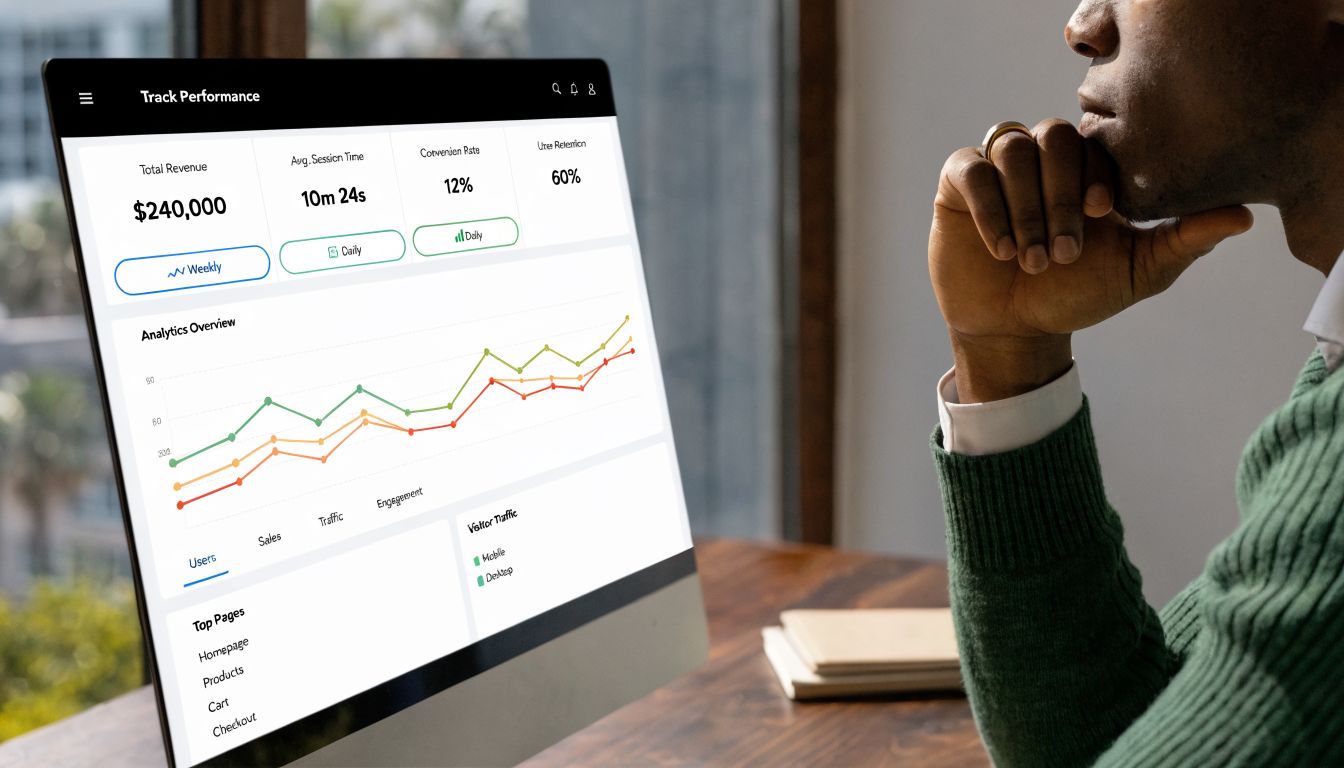
Once the team is operating in the new workspace, the actual job begins. You need proof. Not broad satisfaction, not hallway feedback, but a dashboard that ties workspace changes to business performance.
The strongest dashboards don't track everything. They track what moved because the operating model changed.
The five metrics that matter most
Start with a small set of indicators that leaders can review monthly.
| KPI | Why it matters | What to compare against |
|---|---|---|
| All-in workspace cost per employee | Shows direct financial change | Pre-migration baseline |
| Time to operational readiness for new hires or teams | Reveals scaling efficiency | Previous office setup cycle |
| Internal admin hours spent on facilities | Measures reclaimed management capacity | Historical average |
| IT and facilities issue resolution experience | Shows service quality in daily operations | Prior support environment |
| Reinvestment output | Proves whether savings were turned into growth | Original budget plan |
A dashboard like this keeps the increase in roi grounded in operating facts. If cost drops but issue handling worsens, you've exposed a trade-off. If cost drops and launch speed improves, you've found a structural gain.
Financial ROI isn't the finish line
One of the biggest mistakes I see is stopping the analysis at savings. That's only half the story. The better question is what the business did with the savings.
Recent market data showed streaming video ROI rising from $1.60 to $1.90 per dollar invested in connected TV, according to Morningstar's report on 2025 marketing channel ROI. If a company saves $100,000 annually on office overhead and redirects it into a stronger acquisition channel, the workspace decision stops being defensive cost control and becomes growth funding.
Savings that sit idle improve accounting. Savings that get reinvested improve the business.
That reinvestment doesn't have to be media spend. It might be product hires, outbound sales capacity, customer success coverage, or a market entry test. The KPI should capture that next step, not just the first one.
Build review habits, not just reports
A dashboard only works if someone owns it. Finance should validate cost movement. Operations should validate support and readiness metrics. Team leaders should report friction points that numbers alone may miss.
Use monthly reviews for the first quarter after migration. Look for these signals:
- Costs stayed flat but admin time fell Good sign. You likely bought management capacity.
- Costs fell but service tickets rose Check whether the service scope or onboarding process was incomplete.
- Scaling got easier This is often the strongest hidden gain, especially for delivery teams and support functions.
- Savings were redirected quickly That's where ROI compounds.
The dashboard should stay simple enough for leadership to read in minutes. If it turns into a reporting exercise no one uses, it won't shape decisions.
Frequently Asked Questions About Workspace ROI
Is seat leasing only for startups
No. Startups benefit because they avoid upfront setup and keep cash available, but larger teams use managed workspaces for pilot operations, overflow teams, regional launches, and flexible delivery capacity. The model fits any company that wants less infrastructure burden and faster deployment.
Does a managed workspace reduce control
It changes where control sits. You give up some direct ownership of facilities and infrastructure decisions, but you gain control over speed, cost predictability, and operating focus. The key is choosing a provider with clear service boundaries and escalation paths.
What usually goes wrong in ROI calculations
Teams over-credit the move for every positive result, or they ignore hidden support costs in the old setup. The better approach is to compare pre-migration and post-migration conditions carefully and isolate the actual effects of the workspace change.
Should the decision be based only on monthly price
No. Monthly price matters, but it isn't the full commercial picture. A full comparison includes setup costs, bundled services, internal admin time, support quality, and how quickly the team can become productive in the new environment.
When does the increase in roi become visible
Direct savings usually show up first. Operational gains such as easier scaling, reduced management distraction, and faster team readiness become clearer after the business has run in the new setup long enough to compare patterns against the old one.
What kind of companies benefit most
Teams with changing headcount, time-sensitive launches, multiple vendors to manage, or limited appetite for office CapEx usually see the clearest benefit. Businesses that need plug-and-play readiness often gain the most.
If you're evaluating whether a managed workspace could achieve a real increase in roi for your business, Seat Leasing BPO is worth a closer look. Their model is built for companies that want to cut office overhead, avoid heavy upfront setup costs, and get teams operational quickly without carrying the full burden of facilities, IT, and utility management themselves.