Support starts slipping before support operations admit there's a system problem. Tickets pile up in three places at once. The same customer repeats the same issue to chat, email, and phone. Supervisors keep asking whether the answer is more hires, longer shifts, or another tool.
For a fast-growing company, that pattern gets expensive fast. For a seat-leasing BPO client, it gets riskier because service quality isn't just about customer satisfaction. It affects uptime, client confidence, and whether operations can scale without constant firefighting.
Beyond Support Tickets What Is Advanced Customer Service

Advanced customer service isn't just faster replies or a chatbot on the website. It's an operating model that combines automation, service design, analytics, and human escalation so support can scale without becoming chaotic.
Many customer support operations begin with a reactive model. A customer complains, an agent responds, and the company treats resolution as the finish line. That approach works at low volume. It breaks when ticket types multiply, channels spread out, and agents spend half their day stitching together context from disconnected systems.
What changes in an advanced model
An advanced model does four things differently:
- It uses automation selectively: repetitive questions, routing, tagging, and data capture move out of the agent queue.
- It treats self-service as part of service: knowledge bases, guided workflows, and smart intake reduce avoidable contacts.
- It preserves human judgment: complex, emotional, or exception-based cases reach a person with full context.
- It runs on operational data: queue patterns, response delays, and repeat contacts shape staffing and workflow decisions.
That distinction matters because many companies have already bought AI tools but haven't changed how work moves. According to AmplifAI's 2026 customer service statistics, 88% of contact centers use AI in some capacity, yet only 25% have fully integrated automation into daily workflows. The same report says AI agents cut cost per call by 50% while also improving CSAT scores, which shows the payoff isn't in owning the technology. It's in operational adoption.
Practical rule: If agents still copy information between systems, re-ask basic questions, or manually sort routine tickets, your service model is still immature even if you already "have AI."
For teams exploring orchestration rather than standalone bots, resources like the AI operating system by Sift AI are useful because they frame service as workflow design, not just message automation.
In a seat-leasing environment, this matters even more. You're often building with shared infrastructure, faster deployment windows, and tighter budget discipline. The opportunity is to use that setup as an advantage, not a limitation. A provider such as Seat Leasing BPO can supply the physical and technical backbone, but the service model still needs to be designed with intention.
The Four Pillars of an Advanced Service Model
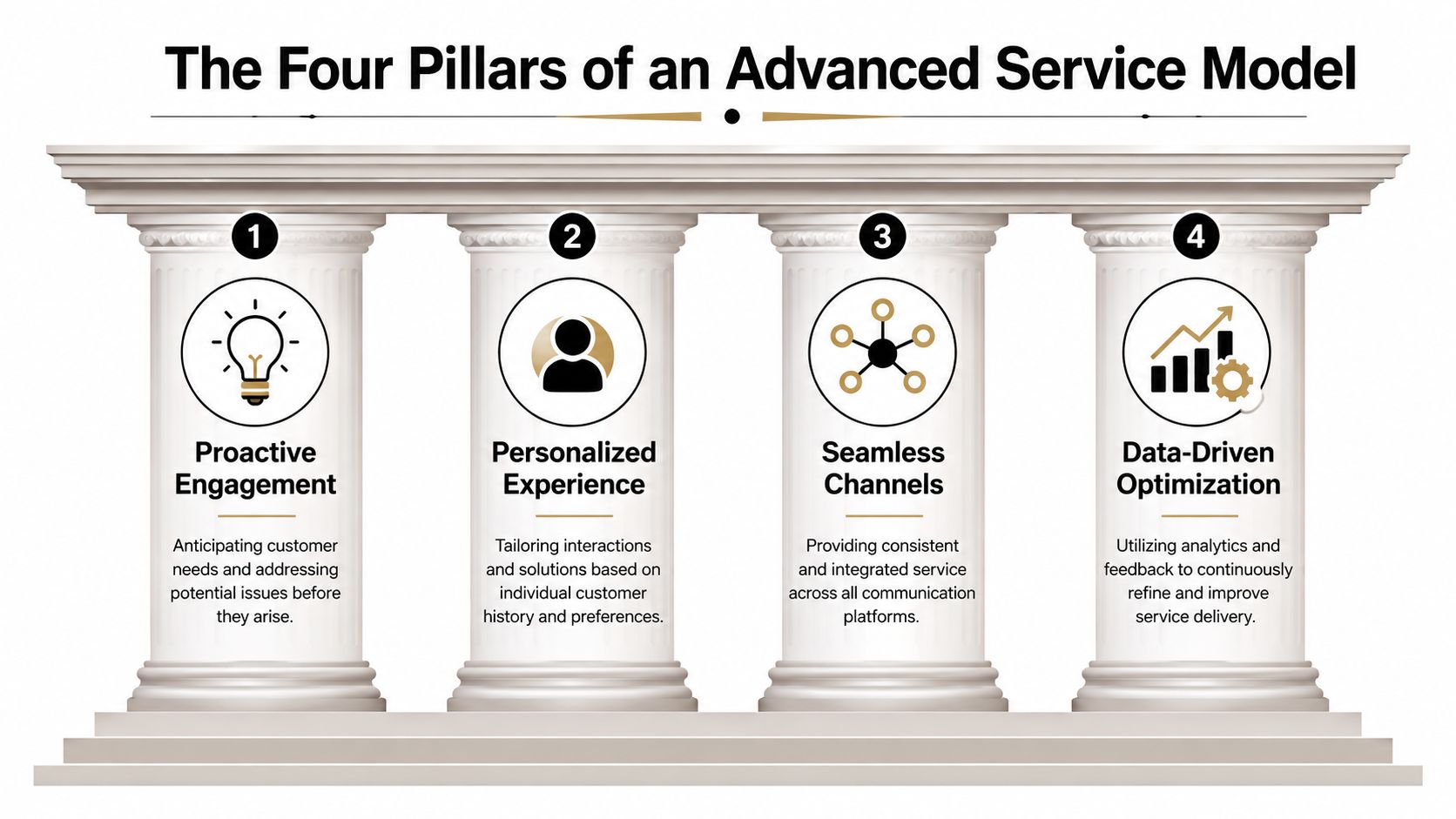
Most advanced customer service failures come from imbalance. A company buys strong software but keeps weak processes. Or it writes strong workflows but gives agents no authority to solve exceptions. The model only works when four pillars support each other.
Technology that shares context
Technology should reduce handoffs, not create new ones. HubSpot notes that modern service stacks combine live chat, chatbots, help desks, and knowledge bases, with CRM integration as the key technical advantage because it enables cross-team data sharing, automated ticket routing, and customized ticket pipelines in one connected environment. HubSpot also describes Nuance's recognition layer as supporting 75 languages and dialects, which is especially relevant for multilingual support teams and BPO operations handling diverse markets through one stack, as covered in HubSpot's overview of advanced service technology.
A practical stack usually includes:
- A CRM as the system of record: customer history, account status, and prior interactions live in one place.
- A help desk for queue control: case ownership, SLA views, tags, macros, and escalation paths stay visible.
- A knowledge base for repeatable answers: customers and agents both pull from the same source.
- Chat and voice tooling for front-end intake: these channels capture demand, but they shouldn't become separate silos.
When these systems don't sync, agents waste time hunting for context. Customers feel that fragmentation immediately.
Processes that decide what happens next
Good service operations don't rely on agent improvisation for every interaction. They define what happens by issue type, channel, urgency, and customer value.
That usually means building three process layers:
- Routing logic for where requests go first.
- Resolution paths for what can be solved through self-service or automation.
- Escalation rules for what must move to a trained human without delay.
The common mistake is over-automating intake without designing the full path. A chatbot that collects information but hands off poorly only adds friction.
Service design is less about adding channels and more about deciding which work belongs in each channel.
People who solve, not just respond
An advanced service team needs agents who can interpret context, not just read scripts. As automation absorbs repetitive work, the human role shifts toward exception handling, empathy, judgment, and account-level problem solving.
That changes hiring and coaching. Teams need people who can:
- Read the customer situation quickly
- Use system data to avoid repeated questioning
- Handle emotionally charged cases calmly
- Spot when a recurring issue signals an upstream process problem
In a BPO or seat-leasing setup, this also means training around shared operational standards. The goal isn't just "good calls." It's consistent service behavior across teams, shifts, and client accounts.
Metrics that reflect customer effort
Traditional support teams often obsess over volume. Advanced teams track whether the operation is becoming easier for customers and more efficient for staff.
Useful metrics include average handle time, first contact resolution, response time, repeat contacts, escalation quality, and customer effort signals. On their own, ticket counts don't tell you whether the system is improving. They may just tell you that customers are still forced to ask for help.
Why Invest in Advanced Service as a Startup or BPO
Growth exposes weak service design faster than weak marketing. A startup can win customers and still lose momentum if support becomes slow, inconsistent, or expensive to scale. A BPO can fill seats and still disappoint clients if service quality depends too heavily on individual agents instead of resilient operations.
Efficiency without linear headcount growth
The first reason to invest is simple. Advanced customer service removes work that shouldn't require a person in the first place. Repetitive contacts, routine routing, basic status questions, and standard policy explanations can move into automated or self-service flows. That frees agents for exception handling and higher-value interactions.
Many teams miss the ROI at this critical stage. They assume service improvement means adding more people. In practice, mature service models often get better by reducing avoidable effort.
Operational resilience matters more than charm
The second reason is resilience. The strongest service organizations don't wait for customers to report every breakdown. They look for friction earlier.
Digital Leadership argues that advanced customer service is increasingly about proactive service recovery and operational resilience, using journey mapping and quality signals to remove friction before customers have to complain. That perspective is especially relevant in environments where service failures can interrupt business operations, as discussed in Digital Leadership's analysis of underserved customer needs.
For a seat-leasing BPO client, that can mean detecting problems around connectivity, access control, onboarding readiness, billing confusion, or escalation bottlenecks before they turn into a wave of tickets.
Better service becomes a selling point
There's also a commercial reason to invest. In crowded markets, product parity is common. Response reliability, channel consistency, and low-friction escalation often become the deciding experience customers remember.
A startup can use service to keep early customers loyal while the product matures. A BPO can use service discipline to reassure clients that growth won't erode quality. In both cases, advanced service is less about being impressive and more about being dependable under pressure.
Strong service operations don't just answer questions. They protect revenue by preventing avoidable friction.
Advanced Customer Service in Action
A useful way to understand advanced customer service is to stop thinking about channels and start looking at operating situations. The tools matter, but the pattern matters more. Teams win when they match the workflow to the problem.
A SaaS team that intervenes before churn risk grows
A SaaS company sees a predictable support pattern. New users don't always submit tickets when they're stuck. They click the same feature repeatedly, abandon setup midway, and only contact support after frustration has built up.
An advanced service approach changes the response. Instead of waiting for a formal complaint, the team uses product signals to trigger in-app help, route setup-risk accounts to a live support queue, and send agents the customer's recent activity before the conversation starts. The value isn't the message itself. It's the timing and context.
A multi-client BPO that manages demand from one control layer
A BPO handling multiple client programs faces a different problem. Each client wants responsiveness, but queue behavior changes by account, time of day, and issue category. Separate tools create blind spots, and supervisors end up reacting late.
The better model is a unified service dashboard with shared routing logic, visibility into recurring contact reasons, and tighter escalation rules between frontline agents and specialist teams. If you're comparing operating models, this overview of leading customer experience strategies gives a useful external perspective on how contact center teams structure consistency across channels.
The biggest service gains often come from removing uncertainty for agents, not just reducing wait time for customers.
A small e-commerce brand using shared BPO infrastructure
A small e-commerce company working from a leased-seat setup usually can't justify building a full support operation from scratch. That doesn't mean it has to accept basic service.
A more practical model uses the provider's shared infrastructure for chat coverage, help desk access, connectivity, and team workspace, then layers on a simple bot for order-status and return-policy questions. Anything outside those flows moves to a live agent with the order context already attached.
That kind of setup is more achievable than most founders assume. It doesn't require a massive in-house build. It requires operational discipline and the smart use of existing infrastructure, which is why practical examples from a seat leasing operations blog can be valuable when you're planning how to run support from a flexible workspace model.
Your 4-Phase Roadmap to Advanced Service
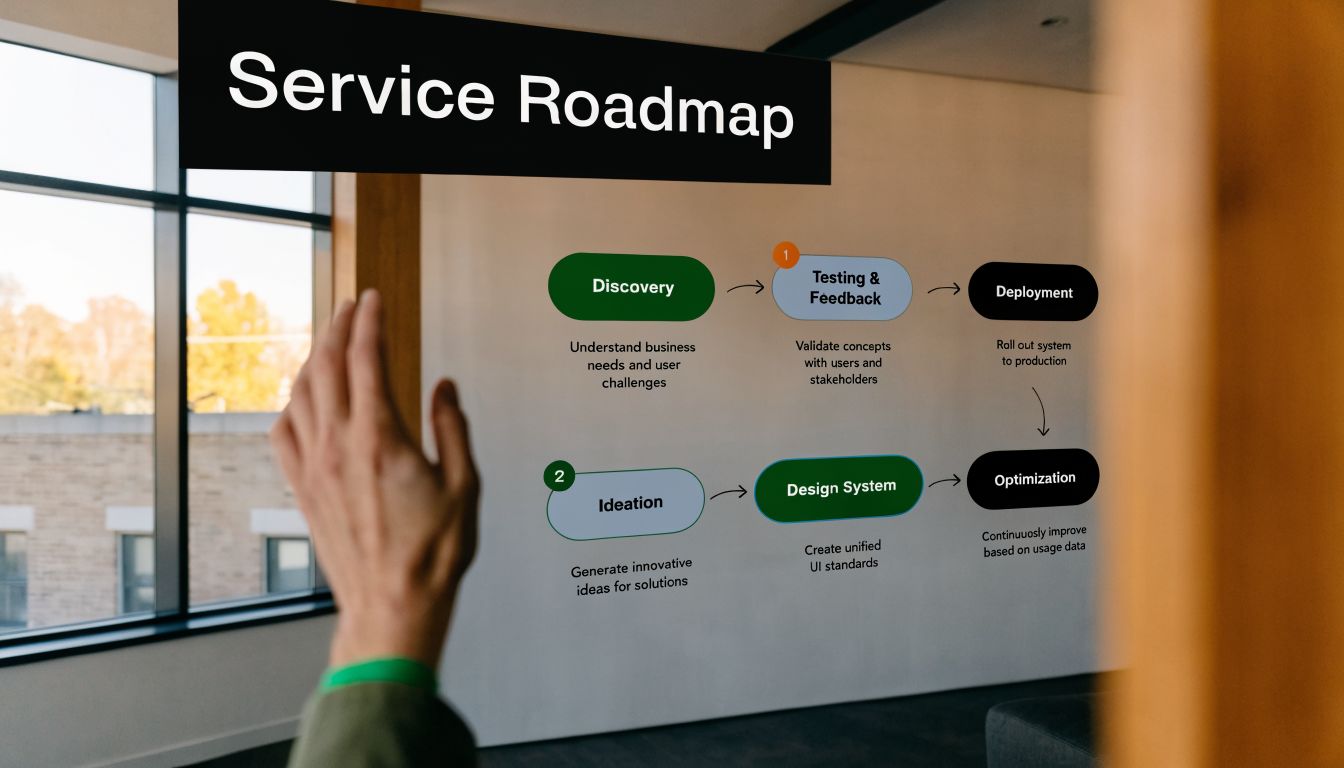
A seat-leasing BPO client doesn't need to build an enterprise contact center on day one. The smarter move is to use the available environment well, then add capability in layers. That keeps capital outlay lower and reduces the risk of buying tools your team can't operationalize.
Phase 1 Build on the infrastructure you already have
Start with the basics that create control. That means choosing a CRM, help desk, channel mix, and ownership rules that fit your actual customer demand.
If you're operating in a plug-and-play environment, audit what's already included before buying anything new. Workspace, internet, IT support, device readiness, and backend operations affect service delivery more than many founders expect. Reviewing the available seat leasing inclusions helps you identify what your provider already covers so you can spend on workflow design instead of duplicating infrastructure.
At this phase, focus on three decisions:
- Where customer history will live
- How tickets will be categorized and routed
- Which issues belong to which channel
Keep it simple. Complexity at launch usually creates cleanup work later.
Phase 2 Automate the obvious work
Once the foundation is stable, automate the tasks that are repetitive and rules-based. Good candidates include account verification prompts, password or access instructions, order-status checks, intake forms, appointment confirmations, and FAQ-driven support.
This is also the right point to launch or clean up your knowledge base. If agents answer the same question repeatedly, that information should exist in a searchable format customers and staff can both use.
A short walkthrough can help teams think through sequencing and tool fit before they overbuild:
The trap here is assuming all automation is good automation. It isn't. If the workflow creates extra steps for issues that were already easy to solve with a human, you've just moved cost around.
Phase 3 Design the handoff before customers need it
Many advanced customer service projects either earn trust or damage it at this specific stage. Nextiva notes that 71% of customers expect personalized interactions and 76% get frustrated when personalization fails, which makes weak escalation design a real loyalty risk, as explained in Nextiva's discussion of contact center problems.
The fix is triage design. Decide in advance which interactions should stay automated and which should move immediately to a person.
Use practical rules such as:
- Send emotional or high-stakes issues to humans first: complaints, billing disputes, outages, access failures, and exceptions need judgment.
- Escalate when the customer repeats themselves: repetition is a signal the automation path is failing.
- Pass context with the transfer: the human should receive conversation history, account details, and the attempted resolution path.
- Give agents authority: if every exception needs supervisor approval, the handoff will still feel broken.
A bot should never hand a frustrated customer to a human who has to ask, "Can you explain the issue from the beginning?"
Phase 4 Run a continuous improvement loop
Once the operation is live, resist the urge to treat setup as finished. Advanced service works because teams keep tuning it.
Review recurring contact reasons, failed bot paths, backlog spikes, and escalations by type. Look for process failures behind the tickets. If customers keep asking the same question, the issue may be onboarding, messaging, billing clarity, or account setup, not support staffing.
This phase is where service becomes a growth asset. The team isn't just responding faster. It's learning which frictions are costing time, trust, and labor, then removing them before volume rises again.
How to Measure Your Service Transformation
Service transformations often stall because teams measure activity instead of performance. More tickets handled doesn't automatically mean better service. It may just mean the operation is busy.
A better measurement model looks at three layers at once. First, is the team working efficiently. Second, are customers getting a smoother experience. Third, is the business seeing stronger retention and less avoidable friction.
Start with operational KPIs
Phocas highlights the importance of analytics around service operations, especially average handle time (AHT), average response time, and first contact resolution (FCR). Front defines AHT as the clock from when an agent begins an interaction until follow-up work is finished. Phocas also notes that analytics can surface service KPIs, drill into feedback, and support better decision-making, which helps teams identify bottlenecks, optimize staffing, and improve FCR, as outlined in Phocas on business intelligence for customer service.
Those metrics matter because they connect workflow quality to customer outcomes. If AHT rises sharply, agents may be missing context or dealing with poor routing. If FCR drops, customers are likely being pushed through too many handoffs.
Use a balanced scorecard
Don't let one metric dominate. A team can force down handle time by rushing conversations and still hurt loyalty. It can also chase satisfaction scores while ignoring inefficient workflows that make scaling harder.
| KPI Category | Metric | What It Measures | Target for Startups/SMBs |
|---|---|---|---|
| Efficiency Metrics | First Contact Resolution | Whether the team solves issues in the first interaction | Improve steadily as routing and knowledge quality mature |
| Efficiency Metrics | Average Handle Time | Total time spent on an interaction, including follow-up work | Keep stable or reduce without sacrificing resolution quality |
| Efficiency Metrics | Average Response Time | How quickly the team acknowledges or answers inbound requests | Short enough to match customer expectations for urgency |
| Quality Metrics | Customer Satisfaction Score | How customers rate the service experience after an interaction | Trend upward as friction and repeat contacts fall |
| Quality Metrics | Customer Effort Score | How easy it was for the customer to get help and solve the issue | Reduce effort by simplifying handoffs and self-service |
| Quality Metrics | Escalation Quality | Whether transfers reach the right team with sufficient context | Increase clean handoffs and reduce repeated explanations |
| Business Impact Metrics | Net Promoter Score | Broader customer willingness to recommend the business | Use as a directional loyalty signal, not a standalone verdict |
| Business Impact Metrics | Customer Churn Rate | Whether service issues are contributing to customer loss | Reduce service-related churn over time |
| Business Impact Metrics | Repeat Contact Rate | How often customers return for the same unresolved issue | Lower as knowledge, routing, and resolution improve |
Watch for patterns, not vanity
One dashboard won't fix anything by itself. Leaders need to review metrics alongside ticket themes, customer comments, and agent feedback.
If your service transformation is working, you should see cleaner routing, fewer repeated explanations, stronger first-contact outcomes, and fewer operational surprises. That is the true sign of advanced customer service. The system gets easier to run as demand grows.
The Future of Service Is a Partnership
Advanced customer service isn't a software purchase. It's a coordinated model made of process, tools, staffing logic, and disciplined escalation.
For startups and lean operators, that's good news. You don't need to build every layer from scratch to run a mature service organization. You do need a setup that gives your team stable infrastructure, clear workflows, and the ability to keep improving.
That's where partnership matters. A seat-leasing model can provide the physical environment and backend support that make service delivery possible, while your team focuses on triage design, knowledge management, automation rules, and performance coaching. Done well, service stops being a support burden and becomes part of how the business scales with less chaos.
The companies that handle growth best aren't the ones with the most tools. They're the ones that design service operations customers can trust under pressure.
If you're building or expanding a support team and want to do it without the overhead of a traditional office setup, Seat Leasing BPO offers a practical way to launch customer service operations on ready-to-use infrastructure so you can focus on workflows, staffing, and service quality instead of office buildout.