It's easy to get the terms mixed up, but the line between a service desk and desktop support is actually quite clear once you see it in practice. The service desk is your strategic, remote-first command center, focused on the bigger picture of user experience and service delivery. Desktop support, on the other hand, is the tactical, hands-on team that handles physical hardware and software issues right at the user's desk.
One is about preventing problems, the other is about fixing them when they happen.
Defining Your IT Frontline
Getting this distinction right is critical for running a smooth IT operation. While both teams exist to help end-users, they operate with different scopes, methods, and goals. Confusing the two roles often leads to bottlenecks, frustrated employees, and wasted IT budget.
While the discussion is more specific than comparing the key differences between customer support vs customer service, the core principle holds true: each function has a unique purpose.
Strategic vs. Tactical Support
A service desk is a strategic function, often built around the Information Technology Infrastructure Library (ITIL) framework. It acts as the Single Point of Contact (SPOC) for all IT-related needs—from simple password resets and software access requests to reporting a system-wide outage. The goal isn't just to fix one issue; it's to manage the entire service lifecycle.
In contrast, desktop support is purely tactical. This is your on-the-ground team that deals with tangible IT assets. When a laptop keyboard fails, a new workstation needs to be configured, or a complex software installation requires an in-person touch, the desktop support team gets the call.
The service desk is your proactive, business-integrated partner focused on service delivery and user enablement. Desktop support is your reactive, technical expert focused on resolving hands-on hardware and software issues.
Service Desk vs. Desktop Support At a Glance
To put it all together, here's a quick side-by-side look at how these two essential functions differ. This table cuts through the noise and highlights the core distinctions.
| Attribute | Service Desk | Desktop Support |
|---|---|---|
| Primary Goal | Strategic service delivery and user enablement | Tactical problem resolution for end-user devices |
| Scope | Broad (all IT services and requests) | Narrow (physical hardware, software, peripherals) |
| Primary Method | Remote (phone, email, chat, self-service portals) | Hands-on (in-person, on-site visits) |
| Focus | Proactive (incident prevention, process improvement) | Reactive (break-fix, responding to escalations) |
| Business Alignment | Aligned with overall business processes and goals | Aligned with IT operational stability and uptime |
Understanding these differences helps clarify where to invest your resources. For many small businesses and startups, the cost-effectiveness of a remote-first service desk is a huge win.
Because they operate remotely with ticketing systems and automation, service desks are typically 30-50% more affordable than maintaining a dedicated on-site team. They can support a large volume of users with a lean staff, making them perfect for companies that need to scale quickly without ballooning their operational costs.
Analyzing Core Responsibilities and Daily Operations
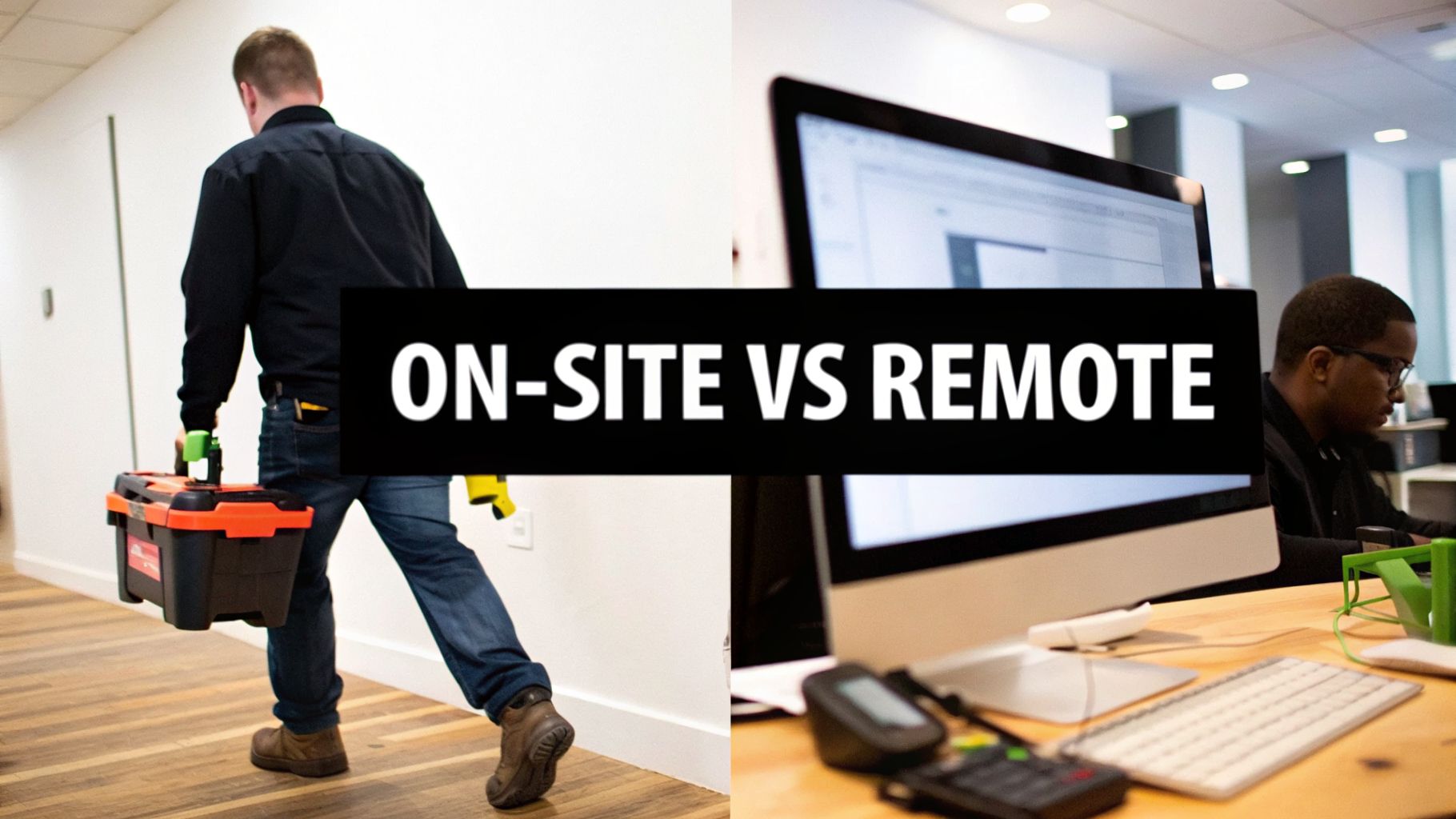
To get to the heart of the "service desk vs. desktop support" difference, you have to look at what these teams actually do all day. While they both keep your IT running, their daily rhythms and core philosophies couldn't be more different. One is strategic and proactive; the other is tactical and reactive.
A great way to think about it is to picture the service desk as the air traffic control for your entire IT operation. They manage the flow of every incoming request, guide users toward solutions using established procedures, and keep a constant watch on the big picture to prevent problems before they even start. Their main job is to be the single, organized front door for all things IT, making sure nothing falls through the cracks.
The Proactive World of the Service Desk
A service desk analyst's day is built around communication, documentation, and trying to solve issues on the first call. Their mission is to resolve things as efficiently as possible, often nipping small problems in the bud before they grow into major outages.
Key Service Desk Duties:
- Incident Logging and Categorization: Every phone call, email, or portal submission is logged as a ticket. The analyst's first move is to correctly categorize it: is this an incident (something's broken) or a service request (someone needs something)?
- Service Request Fulfillment: A huge chunk of their day is spent on routine requests. Think password resets, granting access to a new software application, or setting up a new hire in the system. These all follow pre-approved, repeatable steps.
- Knowledge Base Management: Great service desks are always building their knowledge base. They turn resolved tickets into simple, self-help articles that empower users to fix common issues on their own, which in turn reduces the number of future tickets.
- SLA Monitoring: These teams live and die by their Service Level Agreements (SLAs). They are constantly prioritizing tickets to make sure response and resolution times meet the targets promised to the business.
This is a proactive model focused on managing services, not just fixing hardware. By spotting trends in tickets—like a dozen calls about a buggy software update—the service desk can flag a wider issue and kick off a formal problem-management process to find a permanent fix.
A service desk’s philosophy is rooted in issue prevention and user enablement. The goal is to resolve incidents at the first point of contact and fulfill requests through standardized processes, ultimately cutting down on company-wide friction.
The Reactive Realm of Desktop Support
If the service desk is air traffic control, then desktop support is the ground crew. They're the hands-on specialists dispatched to fix a specific, tangible problem with a piece of hardware or software. A desktop support tech’s day is far less predictable and almost entirely driven by tickets that the service desk couldn't solve remotely.
Their work starts where the service desk's remote tools hit their limit.
Common Desktop Support Tasks:
- Hardware Repair and Replacement: This is classic desktop support. They're the ones diagnosing a failing hard drive, swapping out a bad monitor, or figuring out why a docking station won’t connect.
- Complex Software Installation: While a service desk might push a standard application remotely, desktop support gets called for the tricky installs—legacy programs or specialized software that requires manual configuration and on-site testing.
- Peripheral and Workstation Setup: These technicians build and deploy new workstations for employees. This involves imaging the laptop, setting up the user’s profile, and making sure every peripheral, from printers to scanners, works perfectly.
- On-Site Troubleshooting: When a user has a bizarre Wi-Fi issue that only happens at their desk or a computer that keeps crashing with a "blue screen of death," a technician has to be there in person to run advanced diagnostics.
This role requires deep technical knowledge of hardware and operating systems. The job isn’t about managing a process; it's about hands-on problem-solving. A good day for a desktop technician means they've closed their escalated tickets and gotten people back to work. For a closer look at how this fits into a broader IT framework, you can explore our packaged inclusions for modern office setups.
A Look at the People and the Tech: Skills and Tools for Each Role
Beyond just a list of duties, the real distinction between a service desk and desktop support comes down to the people you hire and the tools you give them. Each role demands a unique combination of soft skills, technical depth, and specific technology. Getting this mix right is critical for both staffing and your budget.
Think of it this way: a service desk analyst is first and foremost a communicator who happens to use technology to get things done. In contrast, a desktop support technician is a hands-on hardware and software specialist who thrives on solving complex physical and system-level problems.
Service Desk: The Communication Hub
The service desk is your company's strategic point of contact for all things tech. The best people for this role are natural communicators with a genuine customer-first mindset. They need to be masters at translating confusing technical problems into simple, understandable language and patiently guiding frustrated users to a solution.
Their most important skills include:
- Exceptional Communication: The ability to clearly explain a fix over the phone, write a helpful email, or guide someone through chat is non-negotiable.
- Customer Service Instincts: This isn't just about being nice. It’s about active listening, showing empathy, and maintaining a positive, can-do attitude when users are stressed.
- Quick Triage: They must be able to rapidly assess, categorize, and prioritize incoming requests based on their impact on the business.
- Detailed Documentation: Every incident and solution must be recorded meticulously. This isn't just busywork; it's how you build a powerful knowledge base for the future.
Their toolkit is all about managing information and solving problems from a distance. A detailed help desk software comparison is a great starting point when choosing the right platform.
The real power of a service desk is its ability to centralize and manage information. Their tools aren't just for fixing one-off issues, but for spotting trends and improving how the entire business operates.
This digital-first approach means your service desk team will live in tools like these:
- ITSM Platforms: This is their command center. Tools like Jira Service Management or ServiceNow are essential for managing tickets, handling service requests, and keeping workflows organized.
- Knowledge Bases: A well-maintained library of self-help articles, FAQs, and troubleshooting guides is their best friend. It empowers users to solve their own problems and reduces the team's workload.
- Remote Access Software: Simple, secure remote control tools are a must, allowing analysts to see exactly what the user is seeing and perform basic fixes without leaving their chair.
Desktop Support: The Hands-On Experts
When a problem is too complex or physically impossible to fix remotely, it gets passed to desktop support. This is where deep, hands-on technical knowledge is king. These technicians are the ones who get their hands dirty—diagnosing, repairing, and maintaining the physical hardware and complex software that your company runs on.
Their core strengths are highly technical:
- Advanced Hardware Knowledge: They need true expertise in troubleshooting and repairing everything from desktops and laptops to printers and other office peripherals.
- Deep Software Proficiency: This goes beyond basic use. They need to understand operating systems inside and out, handle complex software installations, and untangle tricky driver conflicts.
- Network Troubleshooting: They’re the ones who can diagnose localized connectivity problems, whether it's a faulty cable, a bad port, or a tricky Wi-Fi configuration.
- Methodical Problem-Solving: They use a systematic, diagnostic approach to hunt down the root cause of stubborn, intermittent, and often perplexing technical failures.
Their toolset is tangible and geared toward diagnostics and repair. A technician’s toolkit is often filled with everything from diagnostic software to physical repair kits needed to tackle a device failure on the spot.
A well-prepared desktop support team relies on:
- Advanced Diagnostic Tools: Software designed to rigorously test hardware components like memory, storage drives, and processors.
- Imaging and Deployment Software: Tools that allow them to quickly set up and deploy new computers with the company’s standard software configuration.
- Physical Repair Kits: The essential collection of screwdrivers, testers, and other tools for opening up devices, swapping components, and verifying connections.
This division of labor is incredibly effective. Most data shows that a well-run service desk can resolve the majority of inbound requests, with only about 20-30% of cases needing to be escalated to the hands-on desktop support team. For companies looking to get the benefits of both functions without the high initial investment, BPO providers can deliver both specialized skill sets and enterprise-level tools. You can find more practical advice on our blog.
Mapping Workflows and Measuring Performance
To really grasp the difference between a service desk and desktop support, you have to follow the path of a support ticket. How each team works—from the moment a user raises their hand for help to the final "it's fixed" email—reveals everything about their core purpose. One is built for speed and remote efficiency; the other is all about deep, hands-on problem-solving.
Every IT issue starts its journey at the same place: the service desk. Think of it as the front door for every IT request in the company. The process here is deliberate and structured, making sure every request gets logged, sorted, and handled the right way.
The Service Desk Workflow: A Remote-First Approach
The service desk process is all about resolving issues quickly and, whenever possible, without ever leaving the chair. It kicks off the second an employee realizes they have a problem or need something.
A Typical Service Desk Ticket Journey:
- Ticket Creation: An employee needs a license for a new software tool. They log into the company's self-service portal, find the app in the service catalog, and fill out a quick form. This automatically generates a ticket in the IT Service Management (ITSM) system.
- Level 1 Triage: A service desk analyst picks up the ticket. Their first job is to make sure the request has all the necessary info, confirm the user's details, and see if it needs a manager's approval.
- Resolution or Escalation: If it’s a standard, pre-approved item, the analyst can often grant the license remotely using automated tools. The ticket is resolved and closed, sometimes in just a few minutes. If it were a bug, the analyst would follow a script from the knowledge base to try and fix it.
This whole workflow is geared toward First Contact Resolution (FCR). But what happens if the analyst can't solve it? For instance, if the software install keeps failing and they suspect a hardware problem, the ticket gets passed on.
The Desktop Support Workflow: A Hands-On Resolution
Desktop support almost never gets the first call. Their work begins when the service desk escalates a ticket that couldn't be solved remotely. They are the specialists called in for the tough stuff.
A Typical Desktop Support Ticket Journey:
- Receiving the Escalation: A desktop support technician gets the escalated ticket for the failed software installation. Critically, the service desk has already documented everything they tried, so the tech isn't starting from scratch.
- Scheduling and Diagnosis: The technician reaches out to the user to schedule a visit to their desk. Once there, they run deeper diagnostics and quickly find the culprit: a faulty memory stick is causing the installation to crash.
- Resolution and Closure: The tech swaps out the bad RAM, installs the software successfully, and gets a thumbs-up from the user. They then update the ticket with detailed notes on the root cause and the fix before closing it out.
This is the tactical, break-fix nature of desktop support in action. It's about getting your hands dirty and solving a physical problem that remote tools just can't touch.
The service desk is a funnel, designed to resolve the vast majority of issues quickly and remotely. Desktop support is the specialized response team, activated only when a problem demands physical intervention or deep hardware expertise.
KPIs That Tell a Different Story
Since their objectives are so different, you can't measure both teams with the same yardstick. Their Key Performance Indicators (KPIs) reflect their unique contributions.
| Metric Category | Service Desk KPIs | Desktop Support KPIs |
|---|---|---|
| Speed & Efficiency | First Contact Resolution (FCR): What percentage of issues are solved on the first try? A high FCR means your front line is knowledgeable and well-equipped. | Mean Time to Resolution (MTTR) for Escalated Tickets: How long does it take to fix an issue once it's been escalated? This is all about the hands-on team's efficiency. |
| User Experience | Customer Satisfaction (CSAT): A simple post-interaction survey asking, "How did we do?" This is a direct measure of your service desk's communication and problem-solving skills. | Technician Productivity: How many tickets does a technician close per day or week? This is crucial for managing workload and scheduling on-site visits. |
| Operational Health | Ticket Volume Trends: Are ticket numbers going up or down? A sudden spike might signal a major outage, while a steady decrease could mean your self-service tools are working. | Hardware Failure Rate: How often do certain laptop models or peripherals break? This data is gold for making smarter purchasing decisions in the future. |
These metrics cut right to the chase. The service desk wins by providing fast, friendly, and effective remote support. Desktop support proves its value by efficiently cracking the complex, physical problems that make it past the first line of defense.
A Practical Look at Costs and ROI for 2026
When it comes down to choosing between a service desk and desktop support, the budget often has the final say. The real question isn’t just about which model is "better," but which one will give you the best return for your specific business. To figure that out for 2026 and beyond, you have to look past salaries and dig into the total cost of ownership (TCO) for each.
A service desk, with its remote-first approach, has some clear cost advantages thanks to economies of scale. One analyst can field requests from hundreds of users across multiple locations, making it a smart choice for startups and SMBs. The cost structure stays lean, mostly revolving around salaries for remote staff and subscriptions for ITSM and remote access software.
On the other hand, an on-site desktop support team comes with a much higher TCO. The costs go far beyond a paycheck, adding up with things like travel expenses, maintaining a physical stock of spare parts, and buying specialized diagnostic tools. This model just doesn't scale as easily. Supporting a new office or more users almost always means hiring more technicians, causing your costs to grow in a straight line with your headcount.
Calculating Your True IT Support Costs
To make the right call, you need to break down exactly where your money is going. A service desk is primarily an operational expense (OpEx), while desktop support brings in significant capital expenses (CapEx) for all the physical tools and hardware.
Key Cost Components to Analyze:
- Staffing: Don't just look at salary. You have to factor in benefits, ongoing training, and the cost of recruitment. Since remote service desk roles pull from a global talent pool, you can often find great people without paying the premium that specialized, on-site technicians demand.
- Software Licensing: A service desk absolutely depends on ITSM platforms, knowledge bases, and remote access tools. A desktop support team needs those too, but they often add licenses for more advanced imaging and diagnostic software.
- Hardware and Tools: Your desktop support team will need a budget for physical toolkits, diagnostic gadgets, and a ready supply of replacement parts like RAM, hard drives, and keyboards.
Think of it this way: A service desk is an investment in efficient, scalable processes. Desktop support is an investment in hands-on expertise for managing your physical equipment.
The BPO Advantage and Measuring Your Return
For most startups and SMBs, building a full-fledged IT team from scratch is simply too expensive. This is where a Business Process Outsourcing (BPO) partner can be a game-changer. A good BPO can bundle services—like IT infrastructure, software licenses, and support staff—to give you both service desk and on-demand desktop support for a fraction of what it would cost to build in-house.
This approach turns unpredictable capital spending into a steady, predictable monthly operational cost. The ROI quickly becomes obvious when you tally up the direct and indirect savings. For instance, a 2023 report showed that a remote service desk can cut down the need for on-site visits by up to 70%. That means you’re slashing expensive downtime by getting fast answers for most problems, without waiting for someone to show up. You can see more data on how a service desk streamlines support in this detailed comparison.
Let’s take a 50-person startup as an example. Hiring a single, full-time desktop technician could easily cost $60,000 a year in salary alone, not to mention thousands more for tools and benefits. A BPO, in contrast, could offer a fully managed service desk for a fixed monthly fee, giving you wider support coverage and freeing up cash you can pour back into growing your business. You get all the benefits of the BPO's scale, but at a cost that makes sense for you.
Choosing the Right Support Model for Your Business
Deciding between a service desk and desktop support isn't just an IT decision; it's a business strategy decision. There’s no simple "right" answer. The best model depends entirely on your reality—your company's size, where your employees work, how complex your tech is, and of course, your budget.
What works for a 10-person, cloud-native startup is completely different from what a 500-employee company with physical offices needs. For instance, that startup with a remote-first team can get by beautifully with a service desk. Almost every problem is software-based and can be fixed remotely, making hands-on support a rare, ad-hoc need.
On the other hand, a large business with specialized hardware or a manufacturing plant can't function without a dedicated desktop support team. A service desk is still great for the first line of defense, but you need technicians on the ground to handle the physical equipment and keep operations running smoothly.
A Practical Checklist for Your Decision
So, how do you make the call? I always advise clients to start by answering a few straightforward questions. This quick assessment will quickly point you toward the most logical and cost-effective IT support model for where your business is today.
- Employee Count: How many people are you supporting? A tiny team might get away with informal support, but as you grow, you'll need the organized structure a service desk provides.
- IT Complexity: Are your systems pretty standard and cloud-based? Or are you dealing with custom applications and on-premise hardware? The more complex your environment, the more you'll lean toward specialized desktop support.
- Budget: Let's be realistic—what can you afford? A service desk typically comes with a lower, more predictable operating cost. An in-house desktop support team is a much larger investment in both capital and ongoing expenses.
- Hardware Reliance: Do your people rely on physical devices that need hands-on attention? Think printers, scanners, or specialized machinery that can't be fixed through a screen share.
This decision path flowchart helps map out the thought process, guiding you toward the right model based on your team's location and infrastructure.
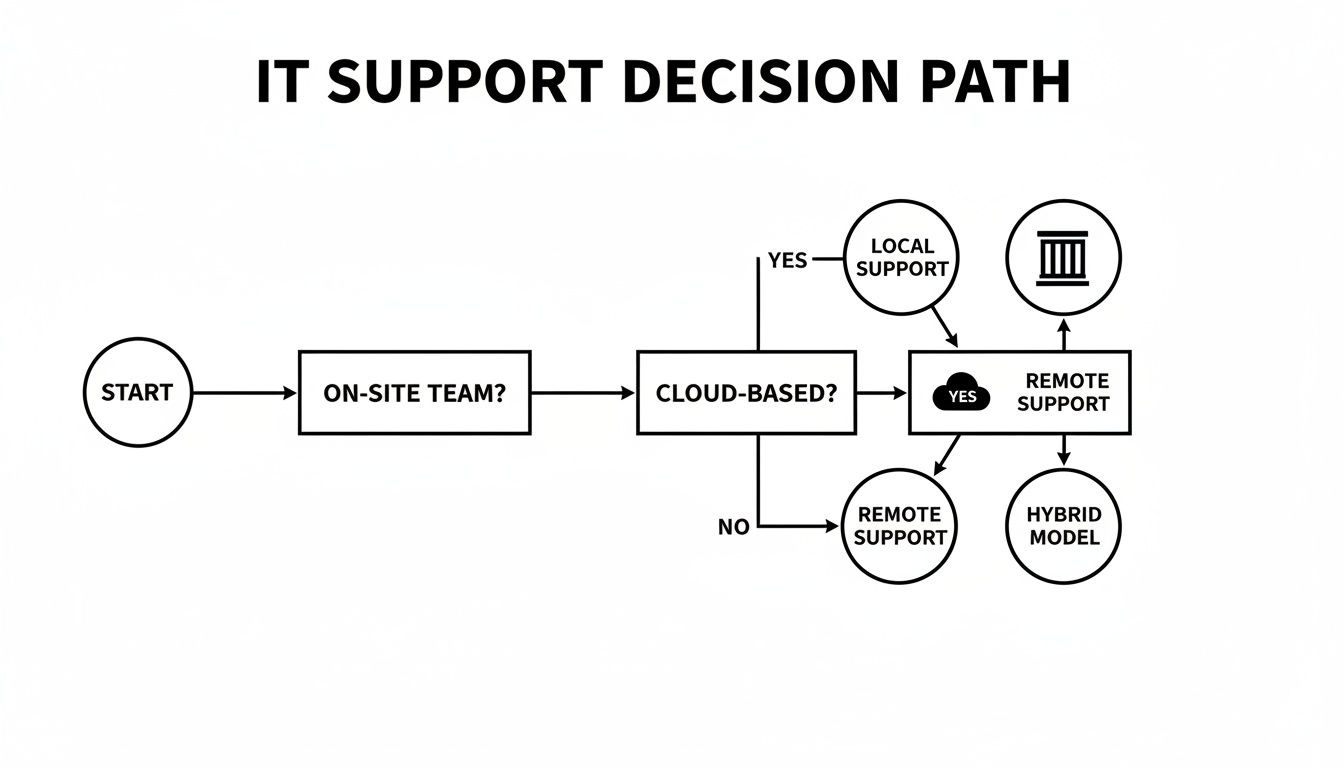
As you can see, for many businesses, the path leads to a hybrid solution that blends remote efficiency with on-site presence.
Integrating Support with a BPO Partner
For a lot of companies, the thought of building—and paying for—two separate IT teams is a non-starter. This is where partnering with a Business Process Outsourcing (BPO) provider can be a game-changer. They can offer a flexible, integrated model that starts with a service desk and adds on-demand desktop support when you need it.
An integrated BPO solution allows you to pay only for the support you actually use. It turns a large fixed cost into a flexible operational expense that scales with your business.
This approach is particularly powerful for businesses that use seat leasing services. For our Seat Leasing BPO clients, from freelancers to entire corporate offices, bundling in a service desk model can cut IT overhead by up to 80%. We handle the backend IT infrastructure so you can focus on your core business.
If you're ready to see how an integrated IT support model can work for you, contact us to discuss a tailored solution.
Frequently Asked Questions
Let's tackle some of the common questions that pop up when you're trying to figure out the right IT support structure for your business.
Can a Small Business Get by with Just a Service Desk?
For most small businesses, the answer is a resounding yes. If your team is mostly cloud-based and uses standard computers and software, a good remote service desk can handle over 90% of all IT tickets. It’s an incredibly efficient and budget-friendly approach that grows with you.
You don't need a full-time technician just sitting around waiting for a hard drive to fail. For those rare physical hardware problems, you can simply bring in a local tech on an as-needed basis. This keeps you from paying for a resource you barely use.
Is It Better to Outsource or Build an In-House Team?
This really comes down to your company's size and complexity. For most SMBs, outsourcing to a BPO provider almost always delivers a better return. You skip the headaches of recruitment, the constant costs of training, and the big checks you'd have to write for specialized software licenses. Plus, you get instant access to a deep bench of experts.
An in-house team starts to make sense when you're a larger enterprise running on highly customized, proprietary systems. In that case, you need dedicated people on-site who know your specific setup inside and out.
How Do Service Desk and Desktop Support Actually Work Together?
In a well-oiled machine, the service desk is always the front door. They're the first point of contact for every issue, and they resolve the vast majority of problems remotely.
When a problem genuinely needs hands-on attention—like a broken laptop or a network outage—the service desk escalates a detailed ticket to the desktop support team. This ensures a smooth handoff, so the technician arrives with all the necessary information. It's a smart workflow that stops people from working on the same problem twice and gets your employees productive again, fast.
Keep in mind, that on-site help comes at a premium. Desktop support requires specialized techs for those moderate-to-high complexity jobs, and their on-site visits can drive up operational costs by 40-60% in major cities. You can see a full breakdown of how these costs compare and what it means for your budget.
Ready to build an IT support model that's both flexible and cost-effective? At Seat Leasing BPO, we provide scalable solutions that blend service desk efficiency with on-demand support, all for a predictable price. Learn more and get started at https://seatleasingbpo.com.