Your product launch is in two days. The team is pushing code, sales is lining up demos, and then the office internet starts dropping packets, a shared file server slows to a crawl, and nobody's sure whether the firewall rule changed or the backup job is choking the network. That's the moment many founders and BPO managers realize they don't have an “IT issue.” They have an infrastructure decision problem.
Most early teams try to patch through it. One person becomes the unofficial sysadmin. Someone's cousin “knows AWS.” A freelancer sets up laptops, a different vendor handles internet, and nobody owns uptime end to end. It works until the business starts depending on it.
IT infrastructure outsourcing is often the first adult decision a growing company makes about operations. Done well, it gives you stable systems, predictable support, and room to scale without building an internal infrastructure team too early. Done badly, it creates hidden dependencies, slow support, and expensive cleanup later.
Why Smart Businesses Outsource Their IT Infrastructure
A founder usually doesn't wake up wanting to compare backup policies, switch redundancy, or endpoint management tools. They want the app live, the team productive, and customers served without interruption. But in-house infrastructure has a way of dragging leadership into work that adds no competitive edge.

The common failure pattern
It usually starts small. A startup runs cloud services on a basic setup, adds a few SaaS tools, buys networking gear for a small office, and asks one engineer to “keep an eye on it.” A BPO does something similar with desktops, VoIP, internet circuits, user permissions, and backups. At first, that feels efficient.
Then the business adds people, clients, and compliance obligations. Suddenly, infrastructure isn't background plumbing anymore. It affects onboarding speed, customer response times, security posture, and whether management can trust the numbers on a dashboard.
Outsourcing makes sense when infrastructure stops being a side task and starts affecting revenue, delivery, or client confidence.
That shift is happening at scale. The global IT outsourcing market grew by 131% from 2021 to 2025 and is projected to reach US$777.70 billion by 2028, according to ConnectBit's summary of IT outsourcing statistics. Businesses aren't outsourcing because it sounds modern. They're doing it because digital operations now need specialist coverage, consistent processes, and systems that can expand without chaos.
Why this isn't just about reducing headcount
Smart operators outsource infrastructure for the same reason strong finance teams outsource selected controls or legal teams bring in specialist counsel. They want expertise exactly where the business is most exposed.
In some organizations, that eventually evolves into a hybrid model where a company builds internal capability after the outsourced foundation is stable. If you want a good example of how mature teams think about that transition, this case on hiring in-house experts for financial institutions is worth reading. It shows a useful principle: outsource to stabilize, then internalize selectively if your scale justifies it.
For startups and BPOs making a first serious infrastructure move, the immediate value is simpler. You get fewer fire drills, clearer accountability, and more time spent on hiring, delivery, sales, and client retention.
Decoding IT Outsourcing Models Which is Right for You
Not every outsourced setup solves the same problem. Some give you space and power. Some give you monitoring and support. Some take over the whole environment. If you pick the wrong model, you either overpay for services you won't use or keep too much responsibility in-house.
Four models you'll actually encounter
Co-location is the closest option to running things yourself. You place your hardware in someone else's facility and use their power, cooling, and physical security. This is similar to renting a secure storage unit for your servers. You still need people who can manage the systems.
Managed services usually means you own some part of the environment, but a vendor handles defined tasks such as monitoring, patching, backups, endpoint administration, or network support. This works when you want help without fully handing over control.
Cloud-managed services sits on top of platforms like AWS or Azure. The infrastructure is cloud-based, but specialists manage provisioning, performance, security controls, cost visibility, and operational hygiene. This is often the most practical option for software startups that don't want to build a platform team too early.
Fully managed MSP partnerships are broader. The provider runs the environment end to end, often including help desk, infrastructure operations, vendor coordination, cybersecurity processes, and business continuity support. For BPOs and distributed teams, this can remove a large amount of coordination overhead.
IT Outsourcing Models Compared
| Model | Cost Structure | Your Level of Control | Best For |
|---|---|---|---|
| Co-location | Facility fees plus your own hardware and admin costs | High | Teams with existing hardware and internal infrastructure talent |
| Managed services | Recurring service fees for selected functions | Medium to high | Companies that want support in specific areas but keep internal ownership |
| Cloud-managed services | Usage-based cloud spend plus management fees | Medium | Startups that need flexibility without building cloud operations internally |
| Fully managed MSP | Recurring bundled service contract | Low to medium | SMBs and BPOs that want one partner accountable for day-to-day operations |
How to choose without overcomplicating it
If your team already has experienced systems people and a clear infrastructure roadmap, co-location or selective managed services can work. If your developers are handling infrastructure on the side, cloud-managed support is usually a healthier path.
If your office operations, support teams, and client delivery depend on stable desktops, network access, telephony, power resilience, and user support, a broader managed model often fits better than piecing together five vendors.
A useful reality check is this: if a key employee leaves tomorrow, could someone else confidently run your environment? If the answer is no, you don't have control. You have dependency disguised as control.
For teams comparing practical operating models around growth and workspace readiness, the articles on the Seat Leasing BPO blog are a useful place to see how infrastructure decisions intersect with office operations.
Unlocking Growth The Strategic Benefits of Outsourcing IT
The strongest reason to outsource isn't that servers are annoying. It's that infrastructure can either speed up the business or slow everything down.
According to Softura's roundup of IT outsourcing statistics, 75% of executives plan to outsource IT infrastructure functions. The same source notes that 70% of businesses find it more cost-effective than in-house teams, and 24% of small businesses outsource specifically to boost efficiency. Those numbers matter, but the operational logic matters more.
Growth needs capacity you can turn on quickly
A growing business doesn't expand in neat, evenly spaced stages. One month you need ten more users, then a new client arrives and you need many more devices, permissions, bandwidth, and support processes all at once. Internal teams often struggle here because they've built for the current state, not the next one.
With outsourced infrastructure, capacity planning becomes a managed process instead of an emergency. That's useful for a startup handling sudden product traction, and it's equally useful for a BPO opening a new team pod or adding client-specific workstation requirements.
Specialized expertise beats heroic generalists
A single in-house IT generalist can be excellent, but one person can't be equally strong at cloud architecture, firewall policy, endpoint management, backup design, vendor coordination, user support, and security operations. That's not a talent problem. It's a scope problem.
Practical rule: If one person is your cloud admin, help desk, security lead, procurement contact, and disaster recovery owner, you don't have resilience. You have a bottleneck.
Outsourcing lets you buy access to specialists without hiring each one separately. In practical terms, that often means better patch discipline, cleaner identity management, better documentation, and faster escalation when something breaks.
Focus has real operating value
Founders should spend their best hours on product, revenue, hiring, and customers. BPO managers should spend theirs on service quality, staffing, client communication, and margin control. Infrastructure deserves attention, but it doesn't deserve to consume executive bandwidth.
That's where it infrastructure outsourcing becomes a strategic enabler. It creates operational slack. Your internal team stops chasing printer issues, unstable Wi-Fi, laptop provisioning delays, and after-hours alerts. They can work on process improvement, automation, and client-facing execution instead.
The businesses that benefit most aren't always the biggest. They're the ones disciplined enough to stop building internal complexity before it becomes a habit.
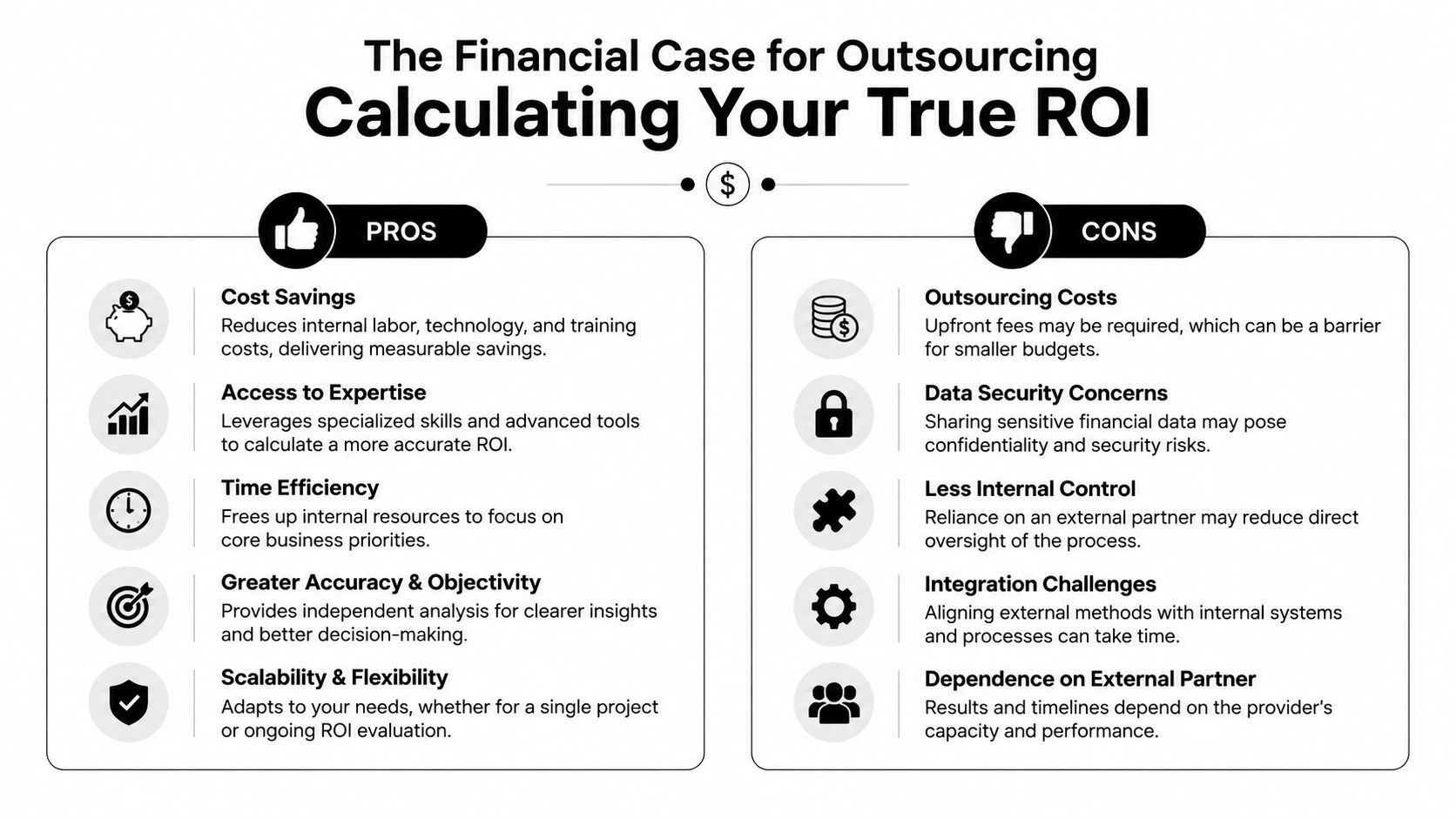
The Financial Case for Outsourcing Calculating Your True ROI
Most companies underestimate infrastructure cost because they only count visible purchases. They price laptops, internet, maybe a firewall, and a few cloud subscriptions. They don't count management time, troubleshooting hours, failed onboarding days, fragmented vendor support, and the cost of replacing a setup that was never designed properly in the first place.
CapEx feels controllable until it isn't
One reason founders keep infrastructure in-house is psychological. Buying equipment feels tangible. It looks like ownership. But infrastructure rarely stays within the first estimate.
According to NCC Data's discussion of IT infrastructure outsourcing benefits, outsourcing can convert over $500K in fixed CapEx to a variable OpEx model, while delivering 30-50% TCO savings through provider economies of scale and higher utilization in multi-tenant data center environments. That's the core financial shift. You stop committing large sums upfront to assets and setups that may be wrong for your growth path.
A simple ROI lens for a smaller team
For a 20-person company, the right question isn't “Can we afford to buy this ourselves?” It's “What else must we own and manage if we choose that route?”
Look at the decision through these cost buckets:
- Infrastructure build costs: Hardware, networking gear, setup labor, software, backup systems, and physical office readiness.
- Operating drag: Time spent by managers, engineers, or admins dealing with incidents, access requests, and vendor coordination.
- Upgrade pressure: Environments age. Needs change. Early shortcuts become replacement projects.
- Downtime exposure: When the setup is brittle, routine problems interrupt real work.
An outsourced model changes all four. It turns lumpy purchases into monthly spend, places accountability under contract, and gives you service capacity that scales more cleanly with headcount.
What usually works financially
The best outsourcing economics show up when you standardize instead of customizing everything. Use common device profiles. Keep onboarding steps documented. Avoid buying office hardware that ties you to one layout or one narrow staffing plan.
Cheap infrastructure often becomes expensive operations. Predictable operations usually win over time.
This is why mature operators compare total cost of ownership, not sticker price. The lowest quote often excludes support depth, transition work, or real resilience. The stronger deal is the one that keeps your operating model clean as the business grows.
Mitigating Risk Security, Compliance, and Bulletproof SLAs
Security is the reason many companies hesitate to outsource. That concern is valid. Handing systems to the wrong provider can create risk. Handing them to the right provider usually reduces it because you gain process discipline, documented controls, and support coverage that smaller internal teams can't maintain consistently.
Read the SLA like an operator, not a buyer
A provider can promise “managed support” and still leave you exposed if the agreement is vague. You need to know who responds, when they respond, what's covered, and what happens when they miss.
Tawzef's IT outsourcing statistics page notes that top-tier managed service providers offer SLAs of 99.9% uptime or higher, and that proactive monitoring can reduce incident resolution times by 40-60% compared with reactive in-house teams. Those numbers are useful only if the contract defines them clearly.
Check for these clauses:
- Service scope: Which systems, users, locations, and devices are included.
- Incident handling: Response and resolution expectations by severity level.
- Escalation path: Who owns urgent issues after business hours.
- Planned maintenance rules: When changes can be made and how they're communicated.
- Reporting cadence: What you'll receive monthly or quarterly to review service quality.
Compliance and security proof matter more than sales language
If a provider claims strong security, ask for evidence. For many SMBs, the basics are enough to separate serious vendors from risky ones: documented controls, audit readiness, access policies, backup procedures, and certifications such as SOC 2 or ISO 27001 where relevant to your environment.
You should also ask how they track and review risk over time. If you want a practical reference point for that discipline, this guide on securing cloud assets with risk registers is helpful because it shows how formal risk tracking improves decision-making instead of leaving security as a vague concern.
What lowers risk in practice
A safer outsourced setup usually includes a few habits that smaller in-house teams skip:
- Tighter access control for users, vendors, and administrators.
- Consistent patching across devices and systems.
- Documented backup and recovery routines that are tested, not assumed.
- Change management so infrastructure doesn't drift through ad hoc fixes.
The real risk isn't outsourcing itself. It's outsourcing without clear ownership, evidence, and review.
If a vendor can't explain how they monitor, secure, escalate, and recover, don't trust the proposal. A polished slide deck doesn't compensate for missing operating discipline.
Choosing Your IT Partner A Practical Vetting Guide for SMBs
Many smaller companies don't fail at outsourcing because the idea was wrong. They fail because they picked a provider before they knew what good looked like.
For startups and mid-market firms, remote infrastructure management is the most commonly outsourced function, yet 58% still keep it in-house due to trust issues, according to Gart Solutions' discussion of IT infrastructure outsourcing. That hesitation is healthy. Trust should be earned through verification.
The shortlist test
Before you compare pricing, narrow vendors using operational fit. Ask each provider to walk you through a recent onboarding, a typical incident, and a client environment similar to yours. If they can only speak in generalities, they probably rely on sales language more than delivery rigor.
Use a shortlist like this:
- Support reality: Who answers tickets, what hours are covered, and what happens during urgent incidents.
- Technical ownership: Whether they manage endpoints, identity, backups, networking, cloud administration, or only pieces of the stack.
- Documentation quality: What they document during onboarding and how you access it.
- Security posture: Proof of certifications, policy controls, and access governance.
- Client similarity: Whether they support companies with your pace, headcount pattern, and compliance needs.
Questions that expose weak providers
Weak vendors usually sound confident until you ask detailed follow-ups. Strong vendors don't mind those questions because they already operate this way.
Ask things like:
- How do you onboard a new user, device, or site?
- What's your escalation path for a business-critical outage?
- How do you separate standard requests from emergency changes?
- What reports do you provide leadership each month?
- How do you handle offboarding and access removal?
- What happens if we want to leave? How do you support transition?
That last question matters more than most buyers realize. If the answer is evasive, you may be looking at a provider that depends on friction to retain clients.
Don't stop at contract signature
Vendor selection is only half the job. The first months determine whether the relationship becomes stable or messy.
Build a basic governance routine:
- Assign an internal owner: One person should manage the relationship and approve changes.
- Set a review cadence: Meet regularly to discuss incidents, open risks, and upcoming needs.
- Track service quality: Compare actual response patterns against the SLA.
- Document shared responsibilities: Your team and the provider should know exactly who owns what.
If you're evaluating a bundled solution that combines workspace and infrastructure support, the easiest next step is to contact the Seat Leasing BPO team and ask for a scoped discussion around your headcount, support requirements, and rollout timeline.
The Ultimate Hack Integrated IT and Workspace Solutions
The old model treated office space and IT as separate buying decisions. One contract for the lease. Another for internet. Another for hardware. Another for support. Maybe a different consultant for security. That setup creates handoff problems from day one.
An emerging 2026 trend is the bundling of IT outsourcing with physical workspace solutions, and this model can deliver up to 80% cost savings compared with setting up a traditional office with a separate IT contract, according to Grand View Research market commentary referenced in this trend summary. For startups, SMBs, and BPOs, that bundled approach solves more than cost. It cuts setup time, reduces vendor sprawl, and gives operations teams one accountable partner.
Why the bundled model fits agile teams
A plug-and-play environment works because the dependencies are already coordinated. Connectivity, desks, power continuity, user support, and core IT management are designed to operate together. That reduces the classic startup problem where every vendor says the issue belongs to someone else.
For BPOs, the model is even more practical. You're often scaling people, not just systems. That means workstation readiness, account provisioning, network stability, and physical access all need to line up quickly.
One option in this category is Seat Leasing BPO's service inclusions, which outline a bundled setup around workspace, IT support, connectivity, and operational essentials. For teams that need speed and fewer moving parts, that's often easier to manage than building the stack from scratch.
Integrated workspace and infrastructure isn't just a leasing decision. It's an operating model choice.
When the business needs to get productive fast, the cleanest solution is often the one that removes the most coordination work.
If you're weighing your first serious infrastructure move, Seat Leasing BPO is worth considering for a practical reason: it combines workspace readiness with managed operational support, so you can get teams running without building every piece yourself. For startups, SMBs, and BPOs that need faster setup, lower overhead, and fewer vendor handoffs, that model can simplify one of the most important decisions you'll make.