Starlink in the Philippines currently costs about ₱28,000 upfront for the standard Gen 3 kit and ₱3,800 per month for the residential plan. If you're a BPO operator, that's the headline number, but it’s not the primary decision point. The key question is whether that spend protects revenue better than fiber, or just adds another expensive internet line you won’t fully use.
A lot of teams reading this are in the same spot. You’ve found a workable office, maybe even a promising satellite site, and then connectivity kills the deal. Fiber is delayed, unstable, or unavailable. That’s where the starlink philippines price becomes more than a consumer question. It becomes an operations question, a continuity question, and ultimately a margin question.
For a seat-leasing environment, internet isn’t just utility spend. It’s revenue-enabling infrastructure. One dead WAN link can idle agents, delay onboarding, trigger SLA pain, and turn a cheap site into an expensive mistake. That’s why I don’t look at Starlink as “internet from space.” I look at it as either a backup line, a fast deployment tool, or a primary connection for places where terrestrial providers still can’t deliver.
Starlink in the Philippines What Is the Real Cost in 2026
Your operations lead has a site ready in Clark, Iloilo, or a secondary city. Seats are furnished, hiring is underway, and client onboarding is blocked by one problem. The fiber install date keeps moving. In that situation, starlink philippines price is not a consumer shopping question. It is a revenue protection question.
For a BPO, Starlink only makes sense if it helps you open faster, stay online longer, or reduce the cost of downtime. That is the standard. Ignore the hype and run it against business continuity.
The entry cost is easy to quote. The business case is not.
A typical starting point in the Philippines is a one-time hardware purchase plus a monthly service fee. Use that as a rough planning baseline, then pressure-test whether the line will serve as primary connectivity, temporary access, or failover. That distinction changes the ROI fast.
Why BPO operators even consider it
BPO operators look at Starlink when terrestrial providers create operational drag. Delayed installs, weak last-mile infrastructure, and poor backup options all hit the same KPI: billable seat availability.
Starlink is strongest in two cases. First, it gets a new site online while you wait for fiber. Second, it gives you an independent path when your main carrier goes down. Those are practical uses with clear financial value. A seat-leasing business does not get paid for low monthly internet cost alone. It gets paid for uptime.
The metric that matters
Use cost per usable connected seat.
If a link is cheap but unstable, the savings disappear the moment agents lose talk time, QA misses targets, or a client questions your resiliency plan. If a more expensive link keeps 20, 50, or 100 seats productive during a carrier outage, the math can swing in Starlink’s favor very quickly.
This is also where many buyers get the comparison wrong. They compare Starlink to fiber as if both are simple substitutes. For most BPO environments, they are not. Fiber remains the better primary line for dense production floors because it is usually more predictable and easier to scale. Starlink earns its keep as a rapid-deployment line, a branch-office option, or a failover path that is physically independent from your terrestrial provider. If you want a wider benchmark for evaluating carriers and service types, Clouddle's insights for enterprise internet are a useful reference.
Practical rule: If internet delay prevents a site launch or a carrier outage idles agents, the biggest cost is lost production, not the monthly subscription.
Breaking Down the Full Starlink Philippines Price
A 50-seat floor does not buy Starlink by the month. It buys risk reduction, time to launch, and backup capacity. Price the service that way or you will make the wrong call.
For a standard 2026 setup, the visible costs are straightforward.
| Cost Component | Estimated Amount (PHP) |
|---|---|
| Standard Gen 3 hardware kit | ₱28,000 |
| Residential monthly plan | ₱3,800 |
That gets you the dish, router, cabling, and the basic equipment needed to bring the link online, as noted earlier.
What the published price misses
The list price is only the starting point. A BPO operator should separate three buckets before approving any order: upfront hardware, monthly service, and site-specific deployment cost.
The hardware is a one-time charge. The subscription is the recurring charge. The third bucket is where budgeting usually goes wrong, especially for rooftop installs or branch sites outside major business districts.
Outsource Accelerator’s Starlink Philippines pricing review also highlighted that public pricing changed from the earlier launch level, and that some locations saw different package figures. Treat any old quote from a landlord, Facebook group, or earlier blog post as stale until procurement confirms the current offer for your exact address.
Costs operators forget to include
These items decide whether Starlink stays a controlled backup cost or turns into an underbudgeted project:
- Shipping and handling: Delivery cost varies by location and seller channel.
- Taxes and local charges: VAT and procurement markups can change the final invoice.
- Mounting hardware: The included setup does not solve every roof, wall, or pole-mount requirement.
- Installation labor: A simple install is cheap. A difficult rooftop with cabling runs, weatherproofing, and safety requirements is not.
- Power protection: If the site has unstable power, add a UPS or small backup power plan. Otherwise the internet survives, but the terminal still goes offline.
For BPO and seat-leasing use, that last point matters more than buyers admit.
A residential Starlink plan can look inexpensive on paper. It looks less attractive once you add install labor, structured cabling, mounting, and power protection. It still makes financial sense if it prevents launch delay or keeps a portion of seats live during a carrier outage.
That is the right comparison. Compare Starlink against outage cost and deployment delay, not against the cheapest urban fiber quote.
If you need context on why terrestrial links can be delayed or expensive in underserved areas, broadband infrastructure construction helps explain the economics behind those gaps.
For a seat-leasing business, the real number is not monthly fee alone. It is monthly fee plus deployment cost, divided by the number of seats Starlink can keep productive when fiber is unavailable.
Will Starlink's Performance Meet Your Business Needs
Your site goes live on Monday. Fiber is still delayed, or worse, the building has fiber on paper and outages in practice. If 60 agents are waiting for logins, the question is not whether Starlink is impressive. The question is whether it keeps enough seats productive to protect revenue.
For a BPO, performance has to be judged at the seat level. Voice traffic, CRM sessions, QA monitoring, VPN overhead, and supervisor video all compete for the same pipe. A connection that looks fast in a speed test can still perform badly on a busy production floor.
Starlink is a major improvement over old satellite service. Latency is low enough for normal business apps and many voice workloads. That matters. Legacy satellite was often disqualified immediately for call handling because delay was too high. Starlink clears that bar, but clearing the bar is not the same as being the best option for every site.
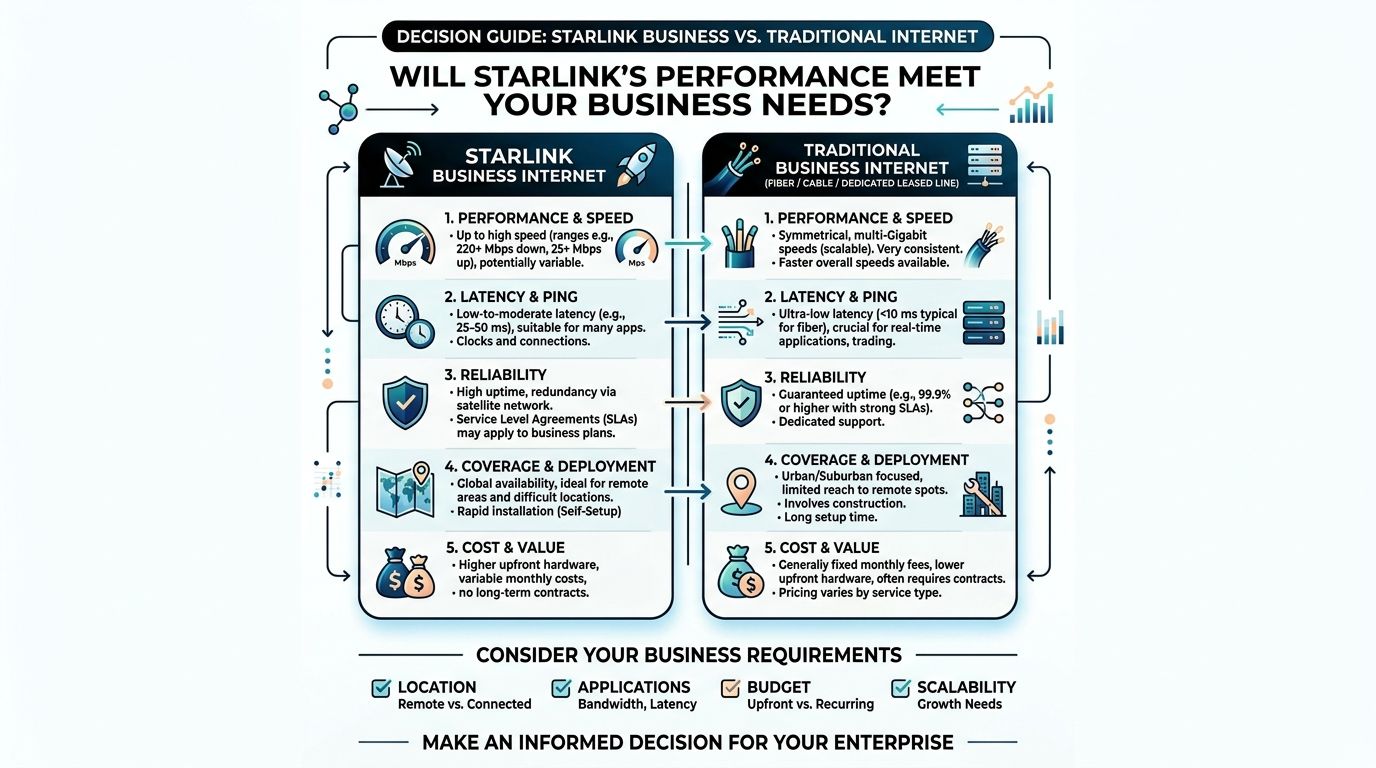
What that means on an operating floor
Here is the practical view for seat-leasing and BPO use:
- VoIP and softphones: Usually workable if call concurrency is controlled and the site is not oversold.
- CRM, ticketing, email, and browser apps: Generally fine.
- Video meetings, screen sharing, and QA reviews: Manageable, but these can consume capacity fast during peak hours.
- Large production floors: One dish is rarely the whole answer. User density changes the math.
Managers make expensive mistakes. They hear that Starlink can deliver strong speeds and assume one terminal can carry an entire floor. That assumption fails under shared load. Production traffic is messy, bursts are real, and quality drops show up first in calls, not in marketing screenshots.
Fiber still sets the standard
Good fiber remains the better primary link for a dense urban BPO. It is more predictable, easier to scale, and usually cheaper per productive seat once you spread the cost across a full floor. If your building has a stable local fiber provider with a clean service record, use fiber first.
Starlink earns its place in a different role. It works well where fiber is unavailable, unreliable, or too slow to deploy. From a business continuity standpoint, that is its key value. It gives you a second path that does not depend on the same local last-mile problems.
That distinction matters for ROI. A fiber line may look cheaper on a monthly bill, but a cheap line that drops your floor during peak hours is not cheap. For a seat-leasing operator, the useful comparison is cost per seat kept live during an outage, not headline monthly fee.
My recommendation
Use Starlink in these cases:
- The site has no dependable fiber option
- The site has fiber, but outage frequency is high enough to disrupt SLAs or occupancy
- You need fast activation to avoid launch delays, idle hiring, or empty seats
Do not default to Starlink as the main WAN for a building with proven, stable fiber. In that setup, fiber usually wins on consistency and cost per seat.
Buy fiber for steady-state operations. Buy Starlink to reduce outage risk, speed up site launch, or keep a portion of revenue-producing seats online when local carriers fail.
Beyond Residential Is a Starlink Business Plan Worth It
A 40-seat satellite office can survive on the wrong internet plan for a week. By month two, the bill shows up somewhere else. Missed calls, idle agents, client complaints, and credits chew through margin faster than the monthly WAN fee. That is why a BPO should stop treating Starlink plans as a consumer price list and start treating them as a continuity decision.
For business use, the split is simple. Residential is the low-cost access tier. Priority is the tier you buy when degraded performance during congestion has a direct revenue impact.
Priority plans are for revenue protection
In the Philippines, Starlink’s business-focused Priority plans range from 50 GB to 2 TB per month, priced from ₱1,950 to ₱141,800, with higher priority data queuing, according to EcoFlow’s guide to Starlink monthly costs. For a BPO, that priority treatment matters more than the headline speed because it affects how well the link holds up when demand rises.
My advice is straightforward. If the link supports voice, client-facing production, or any seat block tied to uptime commitments, evaluate Priority first. The premium only makes sense if it protects billable seats or avoids SLA penalties. If it does not, skip it.
Use Priority for situations like these:
- Voice programs with strict SLA exposure
- Smaller provincial sites where fiber quality is inconsistent
- Operations, command, or leadership teams that must stay online during a carrier outage
- High-value backup design, where Starlink is meant to keep a defined number of seats productive, not just keep email alive
Roam has a narrow business use case
Roam belongs in temporary setups, field deployments, and fast launch scenarios. It is not the default answer for a fixed BPO floor.
The same EcoFlow source lists Roam 100 GB at ₱3,000 per month and Roam Unlimited at ₱5,700 per month. Those plans are useful if you need connectivity before a site is fully built out, or if your operation is mobile by design. For standard seat leasing, Roam is usually a stopgap, not a long-term WAN strategy.
If you are considering a managed office or plug-and-play facility, confirm what the provider already bundles before buying any Starlink tier. Review the typical internet, IT, and facility inclusions in BPO seat leasing packages so you do not pay twice for connectivity.
Which plan fits a seat-leasing operation
Here is the practical way to choose:
| Situation | Better Fit |
|---|---|
| Small remote office with light usage and no stable fiber | Residential |
| Backup link for a fiber-connected office with moderate outage risk | Residential |
| Backup link for revenue-critical teams that must keep working during outages | Priority |
| Fixed site in a weak-served area with client-sensitive production | Priority |
| Temporary site launch, pop-up operation, or mobile team | Roam |
The bottom-line view is simple. Residential minimizes monthly cost. Priority minimizes business interruption. Roam buys flexibility.
For most seat-leasing operators, Starlink Business is worth it only when you can tie the extra spend to protected output per seat. If local fiber is stable, keep fiber as primary and avoid overspending on satellite. If fiber fails often enough to knock agents offline, Priority can pay for itself very quickly.
Modeling Starlink Costs for Your Seat Leasing Operation
Most internet buying mistakes happen because teams compare circuits, not outcomes. A BPO shouldn’t ask, “How much is Starlink?” and stop there. It should ask, “What does this connection cost per productive seat, and what failure risk does it remove?”

Use a cost per connected seat model
Start with a simple framework:
- Add recurring WAN cost for the site.
- Add amortized hardware cost across your chosen internal payback window.
- Divide by live production seats, not total seats on a floor plan.
- Adjust for role, meaning primary link, backup link, or temporary launch link.
If you’re evaluating a managed workspace provider, also check what’s already bundled into the package. A shared office offer may already include internet, IT support, and utilities, which changes your true Starlink requirement. Review the usual seat leasing inclusions for BPO-ready workspaces before you assume you need to source every layer yourself.
A practical 50-seat example
Let’s keep this concrete without inventing unsupported numbers.
Say you have a 50-seat satellite office. Your Starlink residential spend is the ₱3,800 monthly fee plus the one-time ₱28,000 hardware cost already covered earlier. Divide the recurring monthly fee across 50 seats, then separately spread the hardware cost across your internal budgeting period.
That exercise gives you two useful views:
- Pure monthly operating cost per seat
- Blended seat cost including hardware recovery
Now compare that to fiber using the same method. Don’t compare brochure speeds. Compare cost per seat for a usable business connection.
What to watch when you compare fiber
Use a checklist, not gut feel:
- Activation certainty: Fiber that isn’t installed yet has zero value today.
- Redundancy role: A backup line protects revenue even if it’s not the cheapest Mbps.
- Traffic pattern: Video, cloud desktops, and collaboration tools justify better WAN capacity faster than light admin work does.
- Scalability: A connection that works for a pilot may fail once the floor fills.
Your best WAN isn’t the cheapest line. It’s the line that keeps billable seats online when your client expects production.
For many seat-leasing operators, Starlink works best as a continuity layer. It can open a site faster, protect a weak-served location, or keep a floor alive while fiber catches up. That role often creates better ROI than forcing it to compete head-on with healthy urban fiber.
How to Procure and Deploy Starlink in the Philippines
Buying Starlink is the easy part. Deploying it properly is where teams either get a usable business link or a recurring support headache.
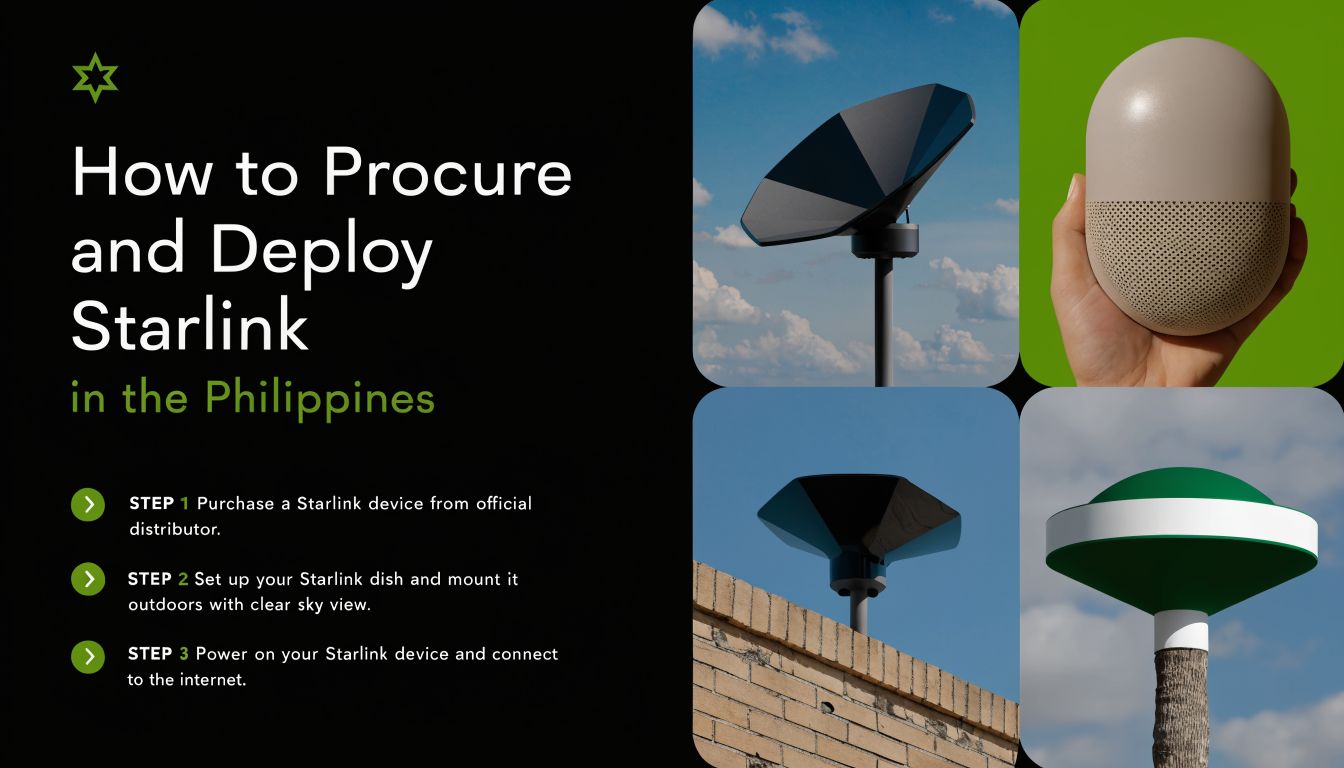
Procurement checklist
For a BPO environment, I’d keep procurement disciplined and boring:
- Order against a defined site role. Decide first whether the unit is for primary use, failover, or temporary activation.
- Validate the service address. Residential service is tied to a registered location, so the address and intended use need to match.
- Confirm local receiving logistics. Make sure your site team can accept, secure, and inventory the hardware.
- Review building access constraints. Rooftop access, landlord approval, and cable paths matter before the box arrives.
If you’re evaluating a ready-built office environment, it also helps to understand how the facility itself is provisioned. A walkthrough of a BPO-ready office and building setup is a practical way to think about where Starlink fits into the site design.
Deployment priorities that actually matter
The hardware setup is not complicated. The site conditions are.
Focus on these three items first:
Sky visibility
The dish needs a clear view upward. Nearby walls, dense tree cover, and awkward rooftop obstructions can hurt performance.Mounting stability
Don’t improvise with a wobbly placement on a risky ledge. Secure mounting reduces maintenance issues and avoids alignment problems.Power planning
Your internet strategy is only as good as your power strategy. If the office has unreliable power, protect the connection with the right electrical planning and internal continuity processes.
What comes in the box and what doesn’t solve itself
The standard kit includes the core hardware needed for operation, but office deployment still requires human judgment. Routing cables cleanly, securing the installation point, and integrating the link into your internal network are operational tasks, not magic.
A clean install matters because support teams will live with the result every day. If you deploy it like a quick consumer gadget, you’ll manage it like one too. That’s not what a production BPO floor needs.
Is Starlink the Right Choice for Your BPO
Here’s the blunt answer. Starlink is a strong option for BPOs in weak-served locations, a smart backup for continuity, and a poor vanity purchase for sites that already have solid fiber.
The mistake is treating it as universally better or universally cheaper. It isn’t. It’s a role-specific tool.
Use this decision framework
| Your situation | Verdict |
|---|---|
| No dependable terrestrial service at the site | Use Starlink as primary |
| Good fiber exists but outages hurt production | Use Starlink as backup |
| You need a new site live fast while waiting for carrier delivery | Use Starlink as interim primary |
| You already have strong fiber and stable redundancy | Starlink may be unnecessary |
My final recommendation
If I were advising a seat-leasing operator today, I’d make the call this way:
- Choose Starlink first when site availability beats infrastructure availability.
- Choose Starlink second when uptime matters more than shaving monthly WAN spend.
- Skip Starlink when the building already has proven fiber performance and a competent backup path.
Buy Starlink for resilience or reach. Don’t buy it just because it sounds modern.
The starlink philippines price is easy to quote. The hard part is assigning the service the right job. Do that well, and it can protect revenue, accelerate occupancy, and give you options in locations where traditional carriers still move too slowly. Do it badly, and you’ll overpay for bandwidth that never had a clear business case.
For custom workspace and connectivity planning, talk to Seat Leasing BPO. If you need a site that’s faster to activate, easier to scale, and built around operational continuity, their team can help you map the right setup without wasting budget on the wrong internet strategy.
If you want a faster path to a production-ready office with built-in operational support, Seat Leasing BPO can help you secure flexible workspace, internet-ready infrastructure, and a setup designed for BPO execution instead of office guesswork.