You log into the queue dashboard at 9:10 a.m. and the pattern is already familiar. Calls in queue are climbing. Supervisors are asking whether to pull people from email. Customers are hanging up before they reach anyone. Your BPO partner says they can add seats, but you’re not sure whether the problem is staffing, routing, training, or a volume spike you should’ve seen coming.
That’s where most growing companies get stuck.
In a Seat Leasing BPO model, you have flexibility most in-house teams would love to have. You can add capacity faster, spread coverage across shifts, and avoid owning the full telecom and office stack. But that flexibility only helps if you manage the queue with discipline. If you don’t, you end up paying for seats without improving service, or worse, you keep blaming “high volume” when the issue is poor routing or broken forecasting.
Calls in queue are not just a phone metric. They’re an operating signal. They tell you whether your staffing model, call flows, agent mix, and customer communication are working together or fighting each other.
How to Measure Your Call Queue Health
At 10:30 a.m., the wallboard can show only six calls waiting and still hide a service problem. If those six callers have already waited too long, or if they are landing with agents who cannot resolve the issue on the first contact, the queue is unhealthy no matter how calm the screen looks.
Count alone does not run a queue. A working scorecard does.
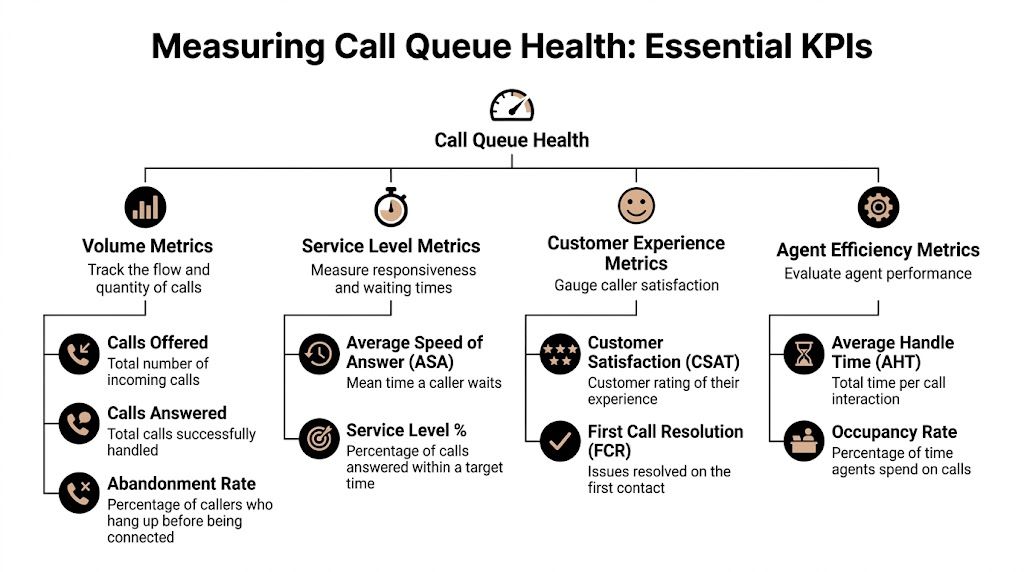
Start with the metrics that change decisions
Track four metric groups first:
- Volume metrics: Calls offered, calls answered, and abandoned calls. These show actual demand and how much work the team absorbed.
- Service level metrics: Average Speed of Answer, service level against target, and longest wait. These show whether customers are reaching a person fast enough.
- Customer outcome metrics: First Call Resolution and customer feedback. These show whether quick answers are producing useful outcomes.
- Agent efficiency metrics: Average Handle Time and occupancy. These show whether the team has enough room to absorb spikes without burning out or idling.
Keep the definitions plain.
Average Speed of Answer (ASA) measures how long callers wait before an agent answers. Rising ASA usually means pressure is building before the queue problem becomes obvious elsewhere.
Abandonment rate measures the share of callers who disconnect before reaching an agent. This is a clear sign of service failure, as the customer leaves before your team can help.
Service level measures the share of calls answered within your target window. Many teams use 80/20 as a starting point, but in a seat leasing model the better target is the one your budget, call mix, and customer expectations can support consistently. A claims line, a sales queue, and a technical support line should not all be managed to the same threshold.
Practical rule: If your report shows answered volume and handle time, but not service level, abandons, and wait time by interval, you do not yet have enough information to manage the queue well.
Build a baseline before you try to fix anything
One rough day is not a trend. Pull enough history to see patterns by interval, by day, and by queue.
Historical reporting in platforms such as Microsoft Teams call queue reports gives you the basics you need: call volume, answer rates, abandon rates, and agent activity over time. That historical view is critical because queue failures usually repeat at the same times and under the same conditions.
For companies using a Seat Leasing BPO setup, flexibility proves useful instead of expensive. If the queue reliably breaks between 11 a.m. and 2 p.m., you may need peak-shift seats rather than more full-day coverage. If Mondays collapse but Tuesdays through Fridays hold steady, the fix may be schedule design, not a permanent seat increase.
That distinction saves money.
Look at the queue hour by hour
Daily averages hide bad intervals. I have seen operations post an acceptable daily service level while one 90-minute block created most of the day’s abandons and callbacks.
Review the queue from four cuts:
- By hour of day to spot repeat peak periods.
- By day of week to identify predictable pressure points.
- By queue or call type so one broken workflow does not distort the full picture.
- By agent group to see whether delays are tied to specific skills, programs, or shifts.
Your baseline should answer a few operational questions clearly:
- When do wait times stretch past target?
- When do callers start abandoning at a higher rate?
- Which call types push handle time up?
- Where do you have staffed seats that are not matched to the right queue demand?
That last question matters more in seat leasing environments than many buyers expect. You can have enough seats on paper and still miss service targets because the wrong skills are assigned during the wrong intervals.
Don’t separate queue health from quality
Answer speed matters. Resolution matters more over time.
A fast answer followed by a transfer, a weak verification process, or a poor interaction just puts demand back into the queue later. Tie queue reporting to QA results so you can see whether a wait-time problem is really a quality problem showing up one call later. If you need a structure for that, Vatis Tech's QA recommendations are useful because they focus on scorecards, coaching discipline, and review routines that operations teams can run.
One metric is often missed here. Track the average wait time before abandoned calls. That number tells you how long customers are willing to tolerate the queue before they leave, which is often more useful than the final abandonment percentage by itself.
What a workable measurement routine looks like
Use a review rhythm your team can maintain:
- Daily review: Calls offered, service level, ASA, longest wait, and abandons by interval.
- Weekly review: Patterns by day, repeat contact drivers, and alignment between staffed seats and actual queue demand.
- Monthly review: Forecast accuracy, seat use, routing fit, and whether the current BPO seat plan still matches volume and call complexity.
The goal is early correction. When you measure queue health properly, you can shift schedules, add targeted seat coverage, or adjust routing before the queue slips into chronic delay.
Diagnosing the Root Causes of Long Wait Times
Long wait times don’t always mean you need more people. Sometimes you do. Often you don’t. The costly mistake is adding seats before you know what’s creating the congestion.
The first pass is simple. Treat long waits as a symptom, then isolate whether the problem comes from staffing, process, or demand.

When the problem is staffing
A queue can deteriorate because too few agents are available at the wrong times, not because the team is too small overall. In seat leasing operations, this often shows up when coverage is flat but demand is spiky.
Watch for these signs:
- Queues swell at the same intervals: You likely have a schedule-fit problem.
- Agents are busy all shift: Occupancy is running too hot and there’s no recovery room.
- Supervisors keep pulling people from other work: The staffing plan isn’t protecting the phone channel.
If the queue recovers quickly after a few extra agents come online, that points to a capacity gap. If it doesn’t, look deeper.
When the problem is process
High waits can start long before the customer reaches the queue. Broken authentication steps, poor desktop workflows, bad knowledge access, and messy transfer rules all stretch handle time.
AHT is where many leaders stop too early. They see calls are long and conclude agents are slow. Sometimes the opposite is true. Good agents are compensating for a clumsy process.
Ask blunt questions:
- Do agents open too many systems before they can answer confidently
- Are they repeating verification because earlier steps didn’t capture enough
- Are transfers happening because the IVR sends mixed call types to the same group
- Do new hires know the policy, or are they placing long holds to ask for help
A queue problem created by process won’t stay solved just because you add seats. You’ll only create a more expensive version of the same bottleneck.
When the problem is demand
Unexpected demand isn’t always unpredictable. Marketing sends an email. Billing changes a term. A product release creates confusion. A shipping issue drives status calls. The queue pays for everyone else’s decisions.
The key is to separate one-time events from repeatable triggers. If spikes line up with campaign launches, invoice dates, outages, or renewal windows, those are operating inputs, not random surprises.
Use a simple diagnostic checklist:
- Recent business changes: Promotions, policy updates, billing cycles, product releases.
- Contact drivers: What are customers calling about?
- Queue entry points: Which numbers, IVR options, or regions are inflating demand?
- Failure concentration: Did wait times rise across the board or in one queue only?
Match symptom to likely cause
A side-by-side review makes this easier.
| Symptom | Likely cause | What to inspect first |
|---|---|---|
| Long waits at the same hour each day | Schedule mismatch | Staffing by interval |
| High abandons but moderate volume | Poor caller experience in queue | Messaging, estimated wait, callback options |
| Long AHT with frequent holds | Process friction or weak training | Agent workflow, knowledge base, supervisor support |
| Rising transfers after answer | Routing problem | IVR choices, queue design, skill mapping |
| Sudden spikes after business events | Demand trigger | Campaigns, billing, outages, product changes |
Use your BPO partner as an operating mirror
A strong BPO partner shouldn’t just say, “We need more seats.” They should be able to tell you where congestion starts, what type of calls are backing up, and whether schedule shape matches queue behavior.
Bring evidence into that conversation:
- Interval-level queue data
- AHT by call reason
- Transfer patterns
- Agent adherence
- Volume changes tied to business events
That changes the conversation from blame to diagnosis.
If your queue review isn’t producing clear action, narrow it further. Pick one bad interval, one queue, and one call type. Listen to those calls. Check the timeline. Look at the staffing roster. Root cause usually becomes obvious when you stop reviewing the whole operation as one blended average.
Strategic Staffing and Workforce Management
Queue management turns on one truth: the difference between a stable queue and a failing queue can be one or two people at the wrong time. That’s why workforce management matters more than broad headcount discussions.
A lot of leaders hear Erlang C and tune out because it sounds too mathematical. Ignore the formula and focus on the purpose. Erlang C helps you estimate how many agents you need to answer a given volume of calls within a target time, based on call arrival patterns and average handling time. It’s a planning tool, not a theory exercise.
Use Erlang C to pressure-test your assumptions
You don’t need to calculate it by hand to benefit from it. Most WFM tools, contact center platforms, and BPO planning teams can model it. The value is in seeing how queue performance changes when occupancy gets too tight.
A practical lesson from Erlang C is that once occupancy runs high, wait times can deteriorate fast. That’s why “we’re only short by one agent” can be a serious problem during a peak interval.
Here’s the operational idea in table form.
| Number of Agents | Agent Occupancy | Service Level (Answered < 20s) | Average Wait Time |
|---|---|---|---|
| Fewer than needed for peak interval | High and unstable | Falls below target | Rises sharply |
| Peak requirement met | Controlled | Near target | More predictable |
| One extra buffer agent | Lower but safer | More resilient | Better during spikes |
That’s the “aha” moment. A small staffing adjustment at the busiest point in the day often does more than adding broad coverage where demand is already low.
Shape schedules around queue behavior
Too many teams schedule to shift convenience instead of contact demand. In a seat leasing setup, that’s a missed advantage. Flexible environments are built for coverage design.
The most useful staffing options are rarely glamorous:
- Split shifts: Put hours where the queue pressure lives instead of paying for a smooth eight-hour block with dead time in the middle.
- Staggered starts: If your volume ramps in waves, agent start times should do the same.
- Blended work: Let some agents handle calls first and email or admin work in quieter windows.
- Micro-overflow teams: Keep a small trained reserve that can move onto the phones when the queue breaches threshold.
The cheapest staffed hour is the one placed exactly where demand peaks. The most expensive staffed hour is idle coverage added because no one rebuilt the schedule.
Plan for seat flexibility, not just agent count
In a Seat Leasing BPO model, you’re not only deciding how many agents to hire. You’re deciding how much live delivery capacity to reserve and when to activate it.
That changes staffing conversations. Instead of asking for a fixed team size, ask for coverage options tied to queue intervals. You may need stable core coverage, plus expandable seat blocks for heavy periods, campaign days, or the first business day after holidays.
Operational planning and facility flexibility converge. A useful reference point is Building 24, which gives context for how workspace readiness supports fast ramping when a program needs extra coverage.
Don’t separate staffing from skill mix
Two agents are not always interchangeable. One billing specialist and one technical support specialist create very different queue outcomes. If the queue is dominated by one call type, general staffing increases can still leave customers waiting for the only people who can solve the problem.
Review your roster in layers:
- Core capacity: Who covers the base forecast every day?
- Peak capacity: Who can absorb the predictable spikes?
- Specialist capacity: Which seats protect complex or high-risk call types?
- Backup capacity: Who can be cross-skilled and pulled in without creating another backlog elsewhere?
Watch the human cost of over-occupancy
When teams run hot for too long, service quality slips before dashboards fully show it. Agents rush openings, skip probing, transfer too quickly, or take longer after-call work just to recover.
That’s why occupancy can’t be treated as a productivity contest. You want productive agents, not trapped agents.
A healthy workforce plan gives the queue enough resilience to handle normal variation. In BPO terms, the strongest staffing model isn’t the leanest one. It’s the one that keeps service stable without paying for unnecessary idle time.
Optimizing Your IVR and Call Routing Strategy
Monday morning. Billing calls are stacking up after a failed auto-pay run, but your main support line is still sending half of them into a general queue. Agents answer, verify the account, realize it is a payment issue, and transfer the caller again. The queue report shows volume pressure. The underlying problem is routing design.

What poor routing looks like in real life
Poor routing creates repeat work inside the same contact. One caller can consume time from two or three agents before anyone starts solving the issue. That pushes up handle time, adds more calls to active queues, and drags down first-contact resolution.
In a seat leasing BPO setup, this matters even more because you can change seat allocation faster than most in-house teams can. If your IVR identifies intent early, you can assign the right seat pool to the right contact type instead of flooding one shared queue and asking agents to sort it out live.
A better design is usually simpler than teams expect. Give callers clear options based on actual contact reasons. Route known issue types to the agent group that owns them. Set overflow rules before the queue is already in trouble.
Build routing around skills, not job titles
Job titles do not route calls. Skills do.
A general support agent, a billing specialist, and a technical troubleshooter should not sit behind the same queue logic if their tools, access, and resolution paths are different. In practice, the cleanest routing setups use a few operational inputs together:
- Caller intent: What is the customer trying to do?
- Required skill: Which team can resolve it without a transfer?
- Current queue conditions: Which group can take the work inside target wait times?
- Business priority: Does this caller need faster treatment because of account value, renewal risk, or escalation status?
That approach is especially useful in a flexible delivery model. Seat leasing gives you room to create narrower teams without committing to a full in-house rebuild. You can reserve a small specialist pod for high-friction contacts, expand it during known spikes, and keep the general queue from absorbing work it was never set up to handle. For broader operating examples, the contact center insights on the Seat Leasing BPO blog are a useful reference.
If your routing logic treats every available agent as interchangeable, the queue will stay inflated because transfers keep adding hidden work.
For a plain-English refresher you can share with finance, product, or leadership teams, how call routing works for business explains the mechanics clearly.
Where IVRs usually break down
IVRs fail in predictable ways. The menu may sound organized internally, but it does not match the language customers use or the way work is handled on the floor.
The common trouble spots are:
- Broad menu labels: “Support” or “account help” sends too many different issues into one path.
- Weak intent capture: The IVR asks what department the caller wants instead of what problem they need solved.
- No queue priority rules: Urgent contacts, vulnerable customers, and high-value accounts sit in the same line as routine requests.
- No overflow plan: Once one queue backs up, calls keep piling into the same bottleneck.
- No callback option: Customers are forced to wait on hold until they abandon.
The fix is operational, not cosmetic. Review the top transfer reasons, then rewrite IVR paths around those failure points. If a large share of callers press one option and still get transferred, the menu is wrong or the routing behind it is too loose.
Add virtual queuing before hold times get ugly
Callback options reduce visible pain fast. They do not reduce demand, but they give customers a better experience during peaks and stop long holds from driving unnecessary abandons.
This walkthrough is worth watching before you configure callback logic with your provider.
Set the callback offer carefully. If you wait too long, customers are already frustrated. If you offer it too early, you can shift too much work out of the live queue and create a second backlog later in the day. The right threshold depends on call type, staffing pattern, and how reliably your BPO partner can return calls within the promised window.
Route by business value, not just by availability
Every call should not follow the same path. A cancellation-risk customer, a fraud alert, and a password reset request do not carry the same operational cost.
Strong routing strategies usually include a mix of:
- Specialist-first routing for issues with high transfer risk
- Priority handling for escalations, VIPs, or revenue-sensitive accounts
- Callback offers for lower-urgency contacts during congestion
- Load balancing for work that is interchangeable across agents
The practical test is simple. If the caller reaches the right team first, resolves the issue without a handoff, and does not re-enter the queue later, your routing is doing its job. If transfers are still carrying the load, start with the IVR, the skill map, and the overflow rules.
Your Implementation Checklist for BPO Partnership Success
Monday at 9:12 a.m., the queue jumps, the client team starts asking for updates, and the BPO floor is waiting for direction. In a seat leasing model, that moment exposes whether the partnership is set up to scale cleanly or whether everyone is improvising. Queue control does not come from dashboards alone. It comes from a written operating agreement that tells both sides what to watch, who acts first, and how fast extra capacity can be brought online without wasting paid seats.

Lock in the operating targets
Start with definitions. If your in-house team and BPO partner calculate service level, queue time, abandon rate, or AHT differently, every review call turns into an argument about reporting instead of a fix plan.
Put these items in writing:
- Service level target: Choose one target and one measurement window. Many teams still use 80/20, but the number matters less than using the same rule on both sides.
- Abandonment threshold: Set the point that triggers action, not just a reporting line.
- AHT definition: Use one formula that clearly states whether hold time and after-call work are included. Talkdesk explains the standard AHT components and formula.
- Occupancy guardrails: Keep a stated range so the provider does not chase short-term service levels by running agents too hot. The Call Centre Helper occupancy guide is useful for setting realistic expectations around pressure, fatigue, and service trade-offs.
In a seat leasing setup, this matters even more because capacity is flexible. Flexible does not mean unlimited. It means you can add, shift, or reserve seats faster than building your own operation, but only if the thresholds are agreed in advance.
Set rules for priority and overflow
One of the biggest advantages of seat leasing is control without owning the infrastructure. You can reserve a smaller core team for steady demand, then define exactly which call types get first claim on overflow seats during spikes.
A workable model usually includes:
- Priority tiers tied to business impact, such as revenue risk, fraud, escalations, or standard support
- Routing by skill inside each tier so urgent calls do not bounce between teams
- Overflow rules that state when secondary queues, blended agents, or reserved seats come into play
- Callback rules for lower-urgency traffic
- Supervisor actions tied to queue conditions, not guesswork
Write down who gets protected first. If every caller enters the same queue under heavy load, your highest-value contacts are waiting behind work that could have been deferred, automated, or routed elsewhere.
Ask for dashboards that support action
A monthly scorecard will not help you manage a queue problem that develops in 20 minutes.
Ask your provider for views that show:
- Interval-level queue patterns
- Abandon timing by interval and call type
- Transfers by queue, destination, and reason
- Performance by intent or call driver
- Seat usage, including committed seats, active seats, and overflow seats
- Forecast versus actual volume so demand surprises get documented, not hand-waved
Then set the review rhythm.
- Daily: service misses, queue spikes, incidents, campaign effects
- Weekly: routing issues, schedule fit, repeat-contact drivers, overflow usage
- Monthly: seat mix, training needs, forecast accuracy, commercial impact
That cadence fits the way seat leasing works. You are not just buying labor. You are managing flexible capacity against changing demand.
Build the surge plan before the surge
Surge response has to be pre-approved. Otherwise, the queue grows while teams wait for decisions.
Document these points:
- Who can approve extra seats and under what conditions
- What queue thresholds trigger overflow
- Which agents can move from blended or back-office work
- How campaigns, product issues, billing runs, or outages get escalated to the BPO
- What service trade-offs are acceptable during peaks, such as longer callback windows or narrower priority handling
This is a real trade-off. Holding too much reserve capacity protects service level but increases cost and idle time. Running too lean improves utilization until one billing event, product release, or promo day breaks the queue. Good BPO partnerships set that balance intentionally.
Apply automation in narrow, useful places
Automation should remove queue pressure or agent effort. If it creates another step without solving a real bottleneck, skip it.
Good uses include:
- Intent capture before routing
- Order, payment, or case-status updates that prevent avoidable calls
- Post-call summaries to reduce after-call work
- Callback workflows that hold the customer’s place without forcing them to stay on the line
If you are evaluating AI tools, focus on fit with the queue, not novelty. This guide on choosing customer service AI features is a practical starting point because it stays close to live support use cases.
Use this checklist in your next provider meeting
Take these questions into the room:
- What call types are creating the longest waits right now
- Which intervals break first when volume rises
- How quickly can additional seats be activated
- Which customers or issues get priority during congestion
- Where do transfers still happen, and why
- What triggers callback, overflow, or supervisor intervention
- Which low-value contacts should be automated or deflected first
- What information does the provider need earlier from your team to forecast better
Vague answers usually mean the queue is being managed by habit.
If you need a partner that can scale seats around your actual demand pattern, talk with a Seat Leasing BPO team about your queue and staffing plan before service levels start slipping.